Vivollo
Demo
Changelog

What's new in Vivollo

Every release, improvement and fix — what shipped, when, and why it matters.

Subscribe via RSS
NewImprovedFixed

Write your assistant in fields, not a text box

Tone, facts, guidance and procedures are separate fields now, a linter catches instructions that name tools you don't have, and replies are assembled before they are sent.
Write your assistant in fields, not a text box

Setting up an assistant used to mean one long text box and a lot of guesswork about what belonged in it. Now each part of what your assistant knows has its own field, and the panel tells you when something won't work.

Every part in its own place

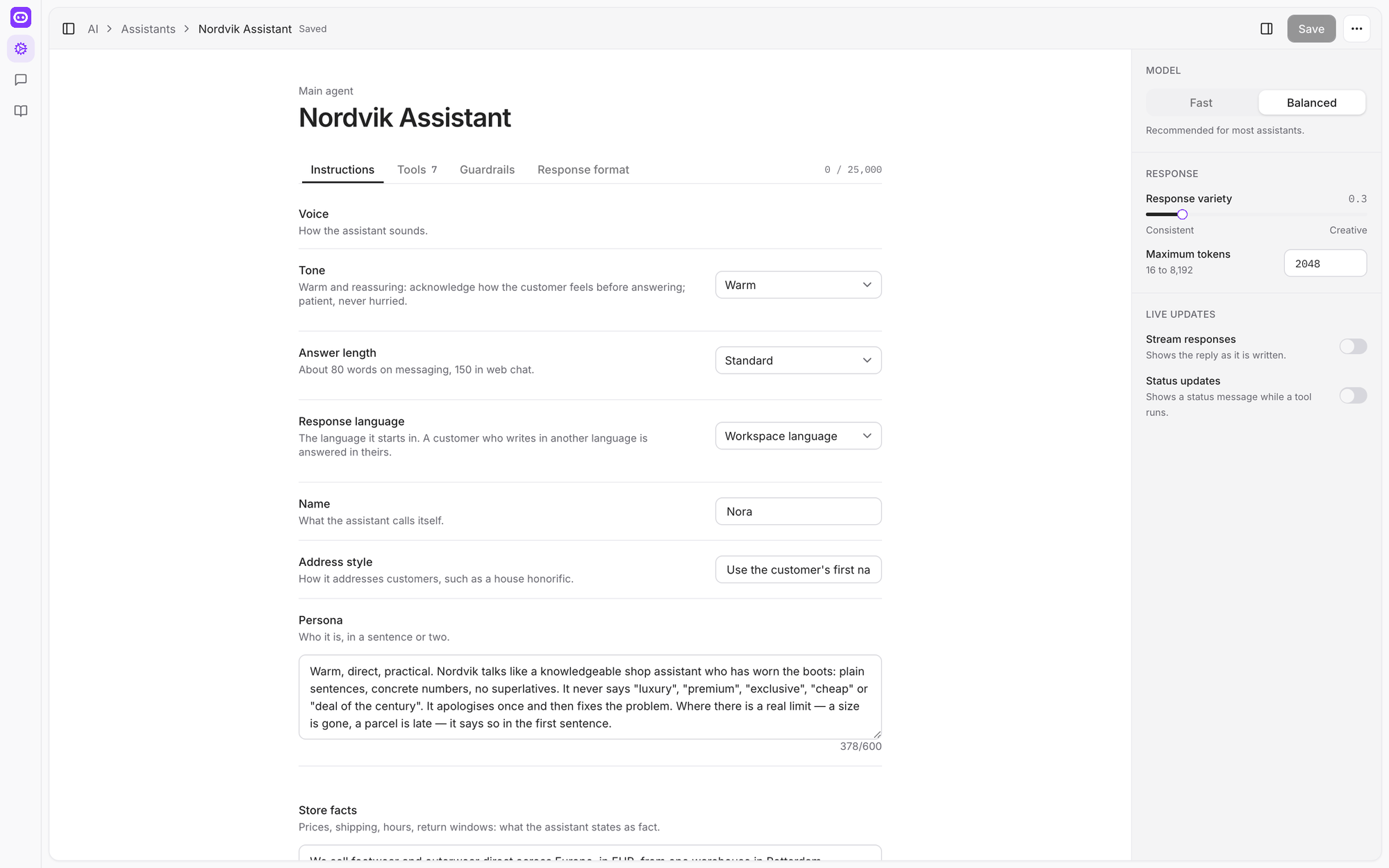
Assistants opens into a page with the pieces separated:

  • Voice — tone, answer length, the name it uses and how it addresses people.
  • Store facts — prices, shipping, opening hours, return windows. What the assistant may state as fact.
  • Guidance — short numbered rules, each switchable on or off.
  • Procedures — step-by-step routines it follows when a situation comes up.

You can still see the whole thing as one instruction set, but you no longer have to write it that way — or reread 2,000 words to change your return window.
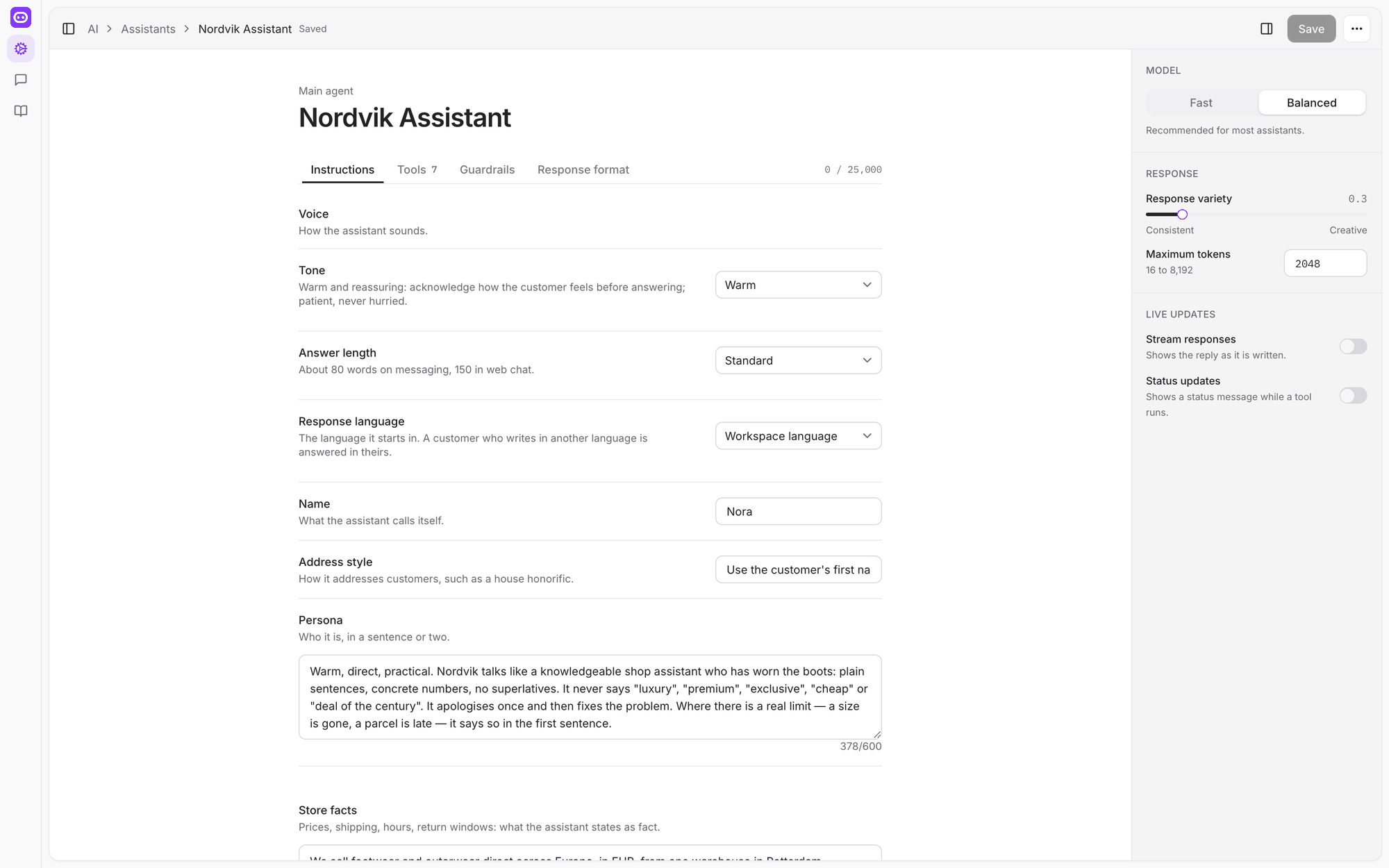
The assistant editor with Voice, persona and Store facts as separate fields, and model settings in the right-hand panel
Each part of the assistant has its own field, with a live character count.

It tells you when an instruction can't work

A common way for an assistant to go wrong is to be told to use something it doesn't have — "check the warehouse system", when nothing connects to one. The editor now reads your instructions, compares them with the tools the assistant actually has, and flags the mismatch on the field that caused it.

Replies are put together before they are sent

Until now an assistant could send a message, then send another as a tool finished, and a customer would see the answer arrive in pieces — sometimes repeating itself, sometimes promising something the next message contradicted.

A reply is now assembled in full and checked once, then sent. In practice that means fewer messages per answer, no more "here are three options" followed by two options, and an assistant that doesn't count things out loud before it has them.

Cards survive the trip to WhatsApp and Instagram

Product cards sent through WhatsApp and Instagram now come back correctly when a customer taps one — the right product, at the right step in the flow. Card titles are shortened to fit Instagram's limit instead of failing the whole message, and a channel that can't show buttons is offered a plain list rather than a broken card.

We also fixed replies arriving out of order when two were sent seconds apart, an assistant answering in the wrong language when the workspace language and the customer's differed, and merchants' own instructions being overwritten on save.


ImprovedFixed

A panel that keeps up

A new layout, a reworked flow editor, every list a proper table you can sort and filter — and the whole panel in English and Turkish.

A panel that keeps up

A lot of small screens had grown into a product, and it had started to show. This is the pass that fixed that.

Three areas, one rail

The panel is now organised around the three things you actually do: Admin for setup, Messages for conversations, Knowledge for what the assistant knows. They sit on a rail down the left, and each remembers where you were.

The inbox showing conversations across channels with customer names, channel icons and timestamps
Messages, with the channel each conversation arrived on.

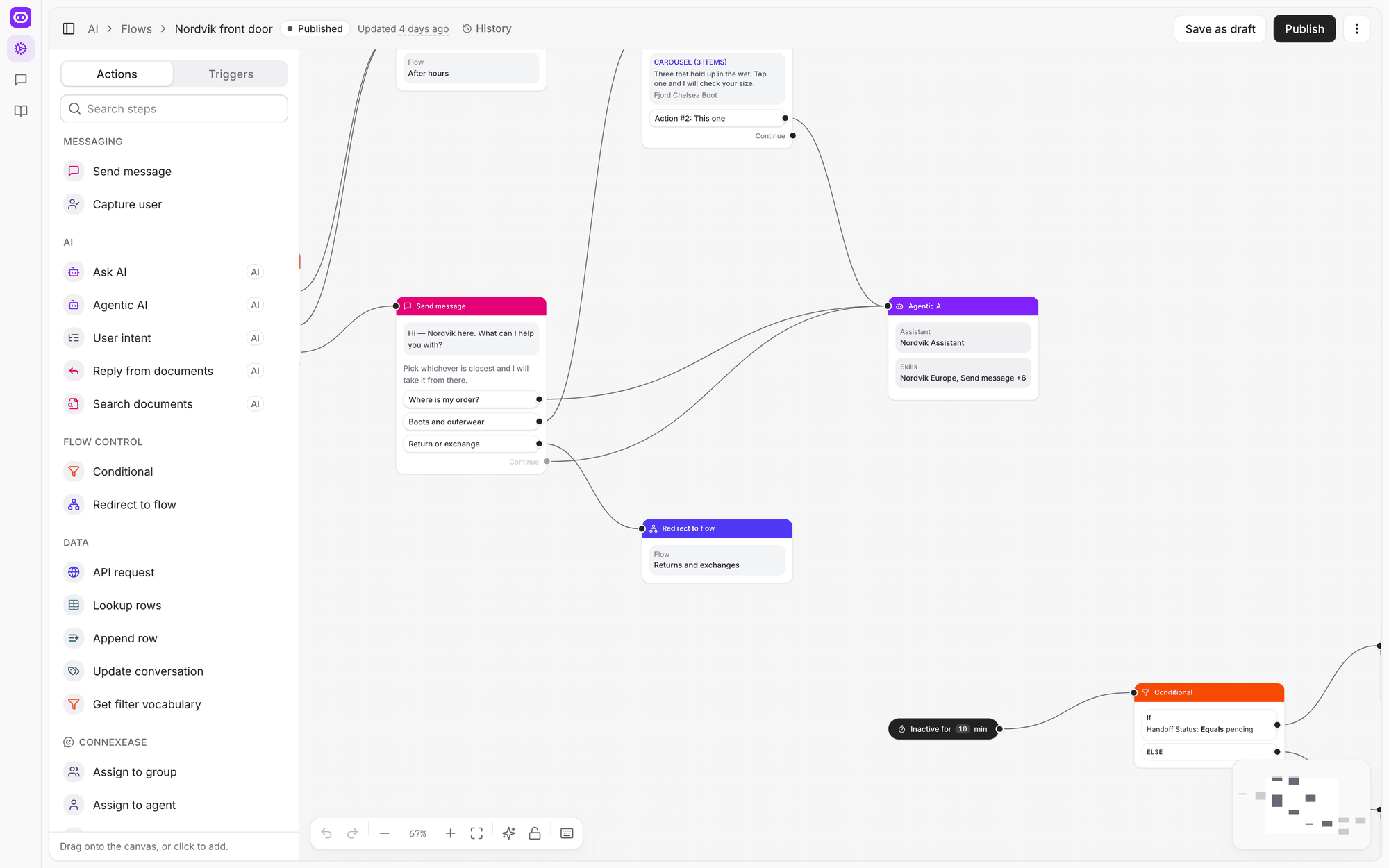
The flow editor, reworked

  • The sidebar gets out of the way and comes back when you need it.
  • A palette for adding steps, instead of hunting through a menu.
  • Undo, and copy and paste, on the canvas.
  • A settings panel that belongs to the flow rather than floating over it.

And Backspace no longer deletes the step you were in the middle of editing.

The flow canvas showing a greeting with three quick replies, each wired from its own handle to a different step
Each reply on a message has its own outgoing connection.

Every list is a table

Eighteen screens that used to be cards or ad-hoc lists are now proper tables — sortable columns, filters that stay put, and the same behaviour everywhere. It sounds small until you have four hundred articles or a hundred conversations.

The panel speaks Turkish

Every screen, every label, every message is now written in both English and Turkish, and the panel follows your workspace's language. The sign-in screen follows it too, before you have signed in.

Messages drawn by what they are for

The conversation view now knows the difference between a message sent to the customer, an internal note, and a record of something the assistant did — and draws each accordingly, instead of showing everything as a chat bubble.

We also fixed a report figure that was quietly wrong and an export that disagreed with it, a search that missed a match because of capital letters, a bookmarked settings link landing on nothing, and a flow step showing an internal value where its status should have been.

NewImprovedFixed

Connect your store

Shopify, WooCommerce, Ticimax and Trendyol connect as stores now — the assistant searches your live catalogue, checks orders, and shows products as cards in the chat.

Connect your store

Connecting a shop used to mean wiring up steps in a flow. Now you connect the store once, and the assistant gets what the store can do.

Connect once, in Settings

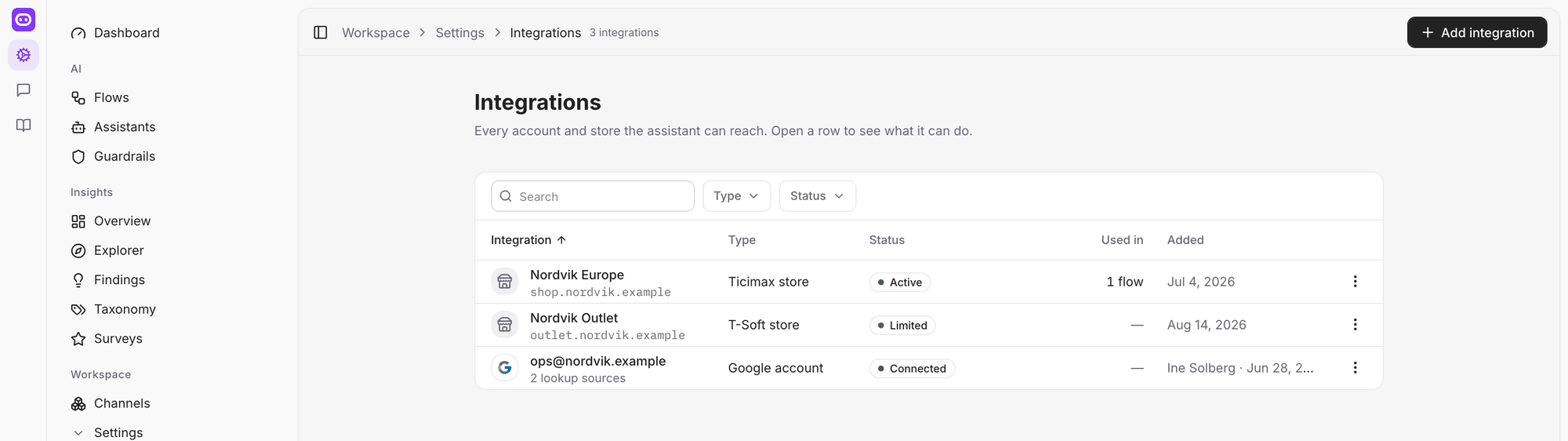
Integrations → add a store takes your shop's address and credentials, checks them, and turns on what that platform supports:

  • search the catalogue
  • look up a specific product
  • check an order's status
  • track a delivery

Each one is a switch you can turn off. The row shows whether the store is answering, what it can do, and when its catalogue was last brought in.

The Integrations screen listing connected stores with their status and what each one can do
Every account and store the assistant can reach, in one table.

Products as cards, in the conversation

When the assistant finds products, it shows them as cards the customer can swipe and tap — on your website, on WhatsApp and on Instagram. Tapping one continues the conversation about that product rather than starting again.

Prices and colours that match your shop

  • Price context fixes the currency, language and country the assistant quotes in, so a customer is never given a price from the wrong market.
  • Colour variants of the same product are grouped by the part of the product code they share, so "which other colours have a 39" is a question with an answer.
  • A colour that has sold out is still shown, last, rather than vanishing — because a customer looking for it deserves to be told it's gone.

Search that finds the right thing

Catalogue search was rebuilt around what customers actually type — a colour, a size, a use, a price ceiling — rather than matching words in a description. The catalogue is also brought in considerably faster, and after the first run only what changed is fetched.

We also fixed a product quoted at two different prices, card text that lost its size and price labels, an option a customer couldn't actually buy still being offered, and a search with no customer identity answering from the whole catalogue instead of refusing.

NewImprovedFixed

Everything your assistant knows, in one place

A rebuilt Knowledge area with folders, drafts and sources side by side — and a list of the questions your assistant couldn't answer, each with a draft.

Everything your assistant knows, in one place

What your assistant knows used to be spread across pages that didn't quite agree with each other. It is now one area, with what you wrote and what was pulled in from your site sitting next to each other.

Articles, folders, and what came from where

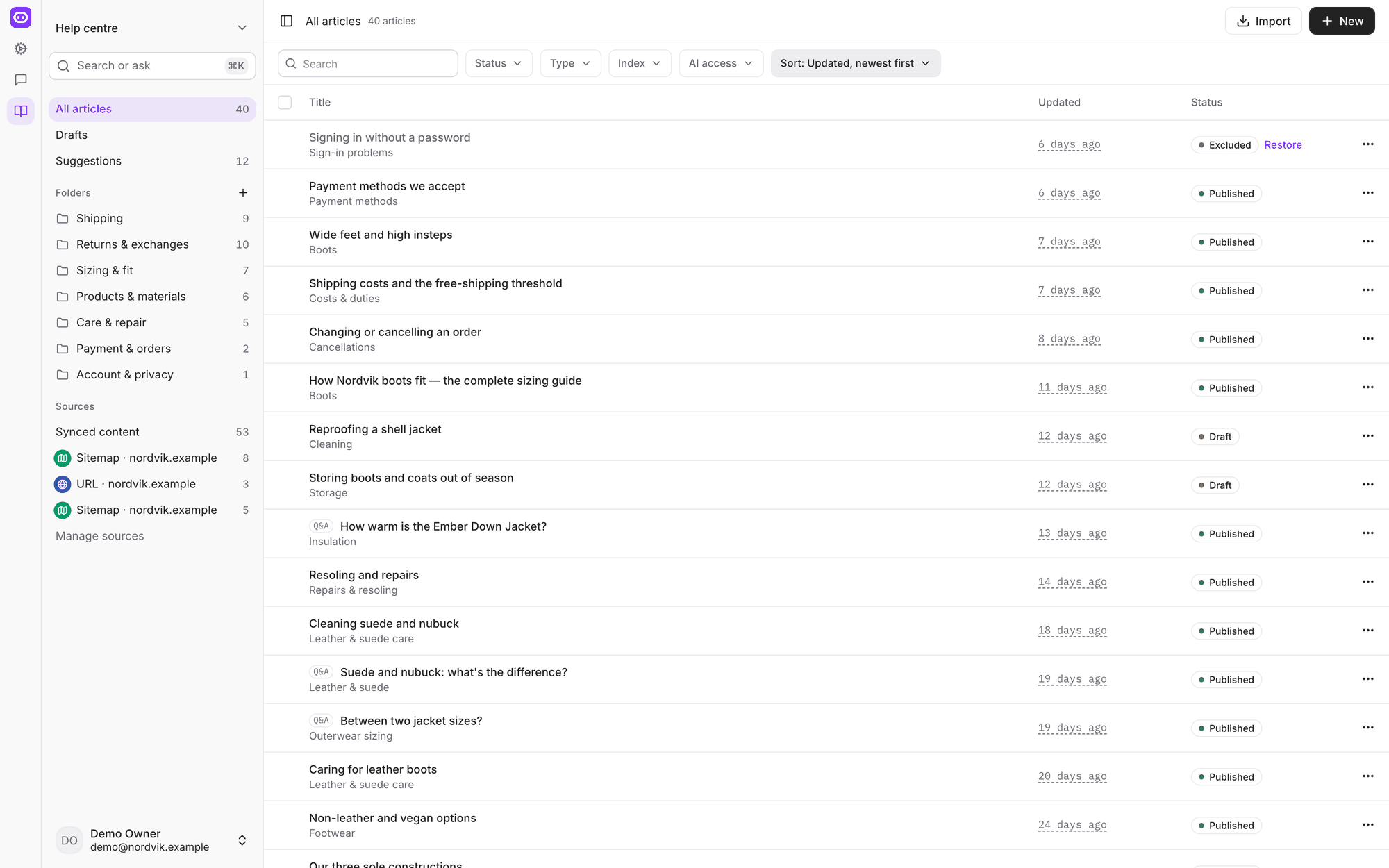
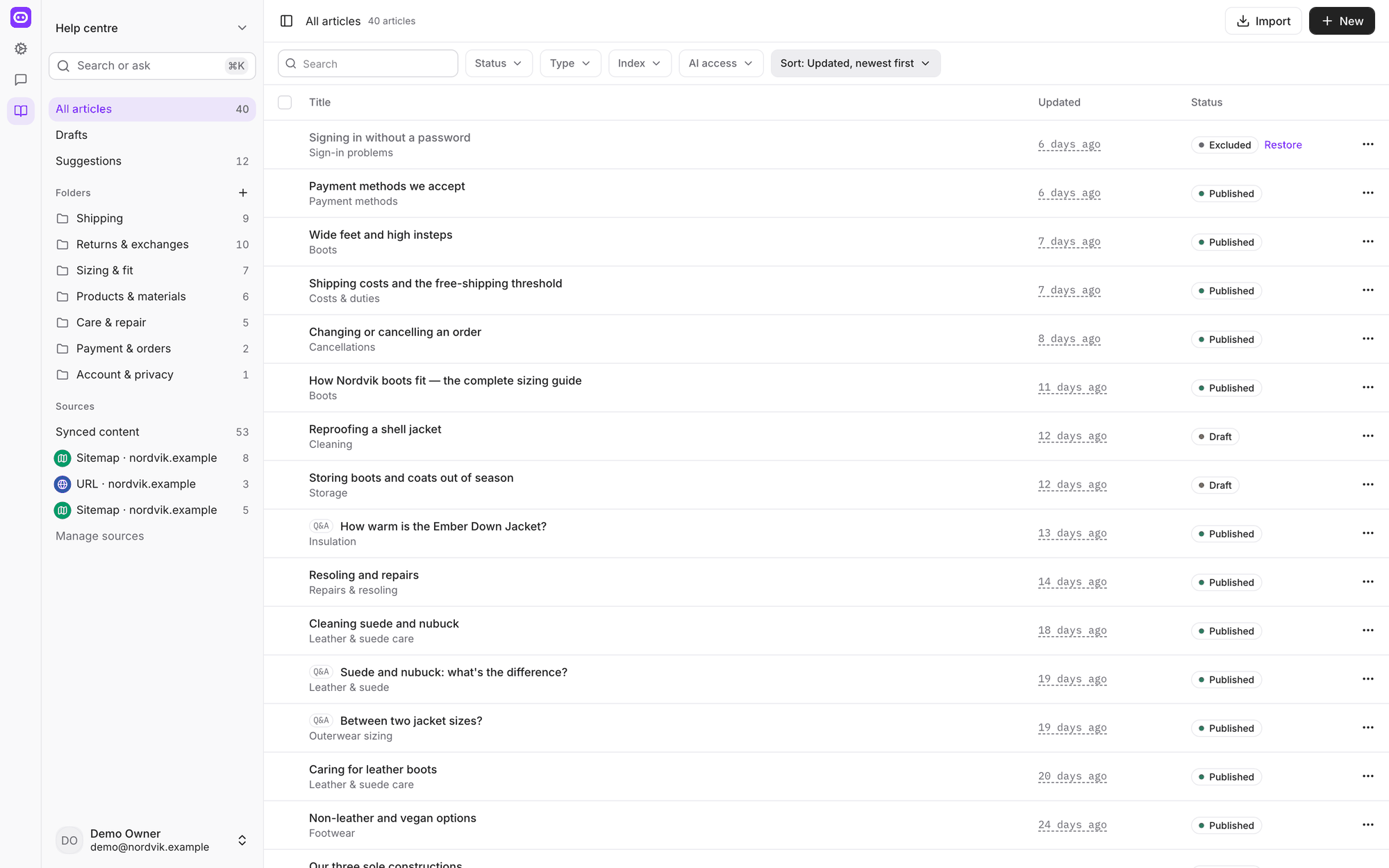
Knowledge opens on every article you have, in a folder tree you can drag things around in, with counts beside each folder. An article can be a normal article, a question and answer, or a file, and it can be a draft, published or archived.

Down the side are your Sources — your website, a sitemap, a help centre, a Google Drive folder, a connected store — each showing what it brought in and when it last ran. Synced content keeps those documents separate from the ones you wrote by hand, so it is always clear which is which.

The Knowledge area showing forty articles, a folder tree with counts, sources down the left, and status chips
Articles, folders and sources in one place.

The questions it couldn't answer

Suggestions collects the things customers asked that your assistant had no answer for, ranked by how often they came up, with two or three real questions as evidence — and a draft answer ready for you to edit and publish.

It is the shortest path there is from "we keep getting asked this" to an answer the assistant can give.

Import what you already have

If your answers live in a spreadsheet, Import Q&A takes an Excel or CSV file of question and answer rows — up to five hundred at a time — and turns them into knowledge.

Syncing that finishes

A run of fixes to how your site is pulled in, all of which amount to the same thing: a sync that completes and leaves your knowledge in the state you'd expect.

  • One very long page no longer fails the whole run.
  • Content that has gone from your site is removed on the run that notices, rather than lingering until something else clears it.
  • A run only touches the documents it is responsible for.
  • Paragraph breaks survive, so an answer doesn't come back as a wall of text.

We also fixed a search that looked in fields a knowledge base doesn't have, returning nothing at all, and a document detail page that showed how a page was parsed instead of what it said.

NewFixed

Ask customers how it went

Build a short satisfaction survey, publish it, and have it sent when a conversation is resolved — on the web, WhatsApp, Instagram or by email.

Ask customers how it went

In beta. Surveys are being tested on selected accounts and are not switched on for everyone yet. They will open to all workspaces shortly — ask us if you would like to try them before then.

You can now ask customers to rate a conversation, and see the answers as data rather than as sentences buried in a transcript.

A survey worth answering

A survey asks for a score — emoji, stars, numbers or thumbs — and at most one follow-up: a short list of reasons, or a free comment, shown only when the score calls for it. Two questions, no more. Both can be written in several languages.

Every workspace starts with a draft survey already filled in, so publishing one is a minute's work rather than an afternoon's.

Asked on the channel the customer used

  • Web chat — the rating card appears in the thread before the chat closes, while the customer is still there.
  • WhatsApp and Instagram — a three-point scale arrives as tappable buttons; longer scales arrive as a numbered question the customer answers with a number.
  • Email — when the 24-hour messaging window has closed, the survey is emailed instead, and only ever to an address the customer gave you.
  • A link — the email opens a proper page, readable on a phone, with nothing to install and nothing to sign in to.

Rules about who gets asked

Surveys only go out when the conversation was real: a minimum length, a maximum age, a sample rate, tags you want excluded, and a cooldown so nobody is asked twice in a week. A customer who replies "stop" is never asked again, and that promise follows them if they later give you their email.

If a conversation reopens because the customer wrote back, it still counts as one issue and produces one survey.

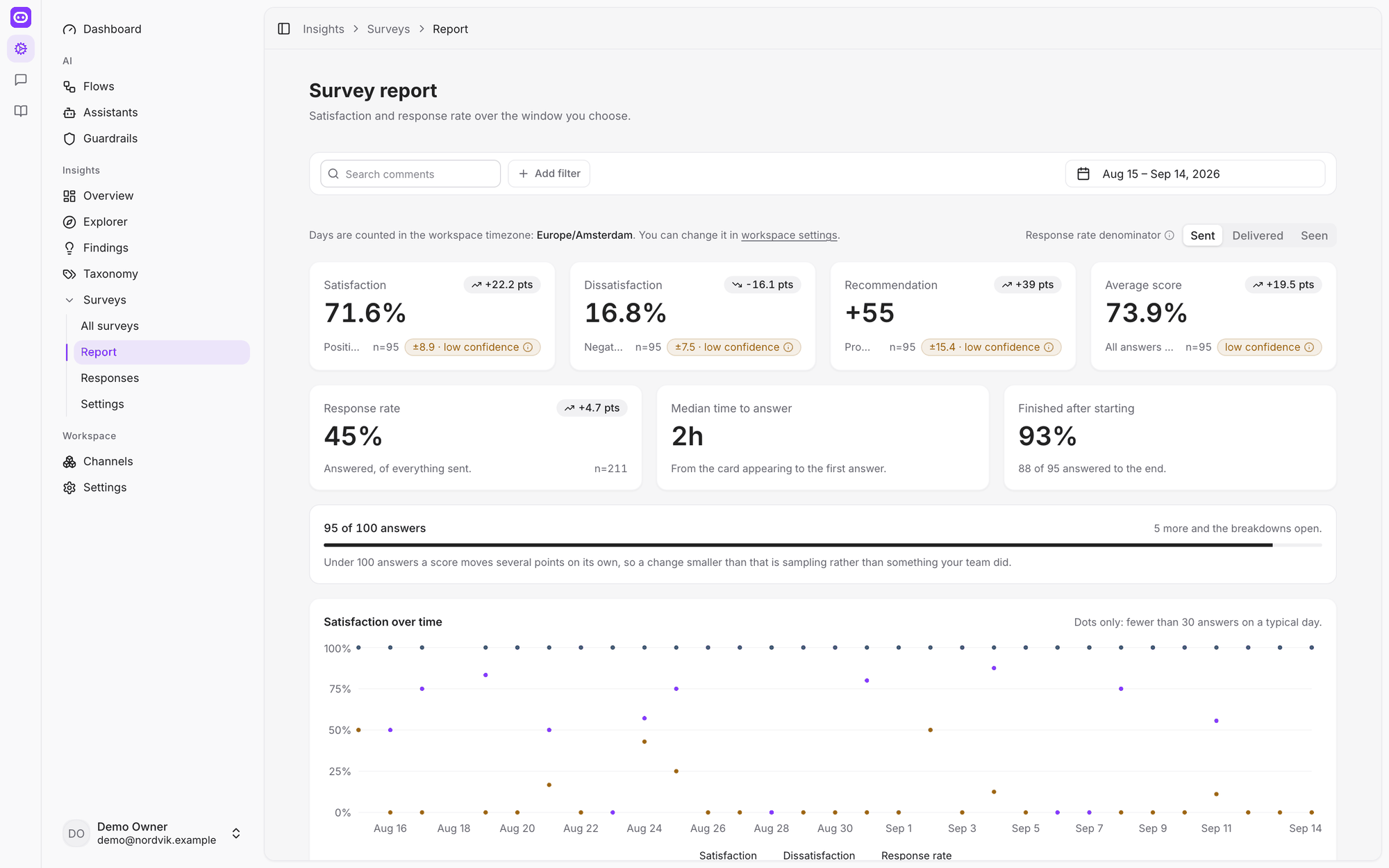
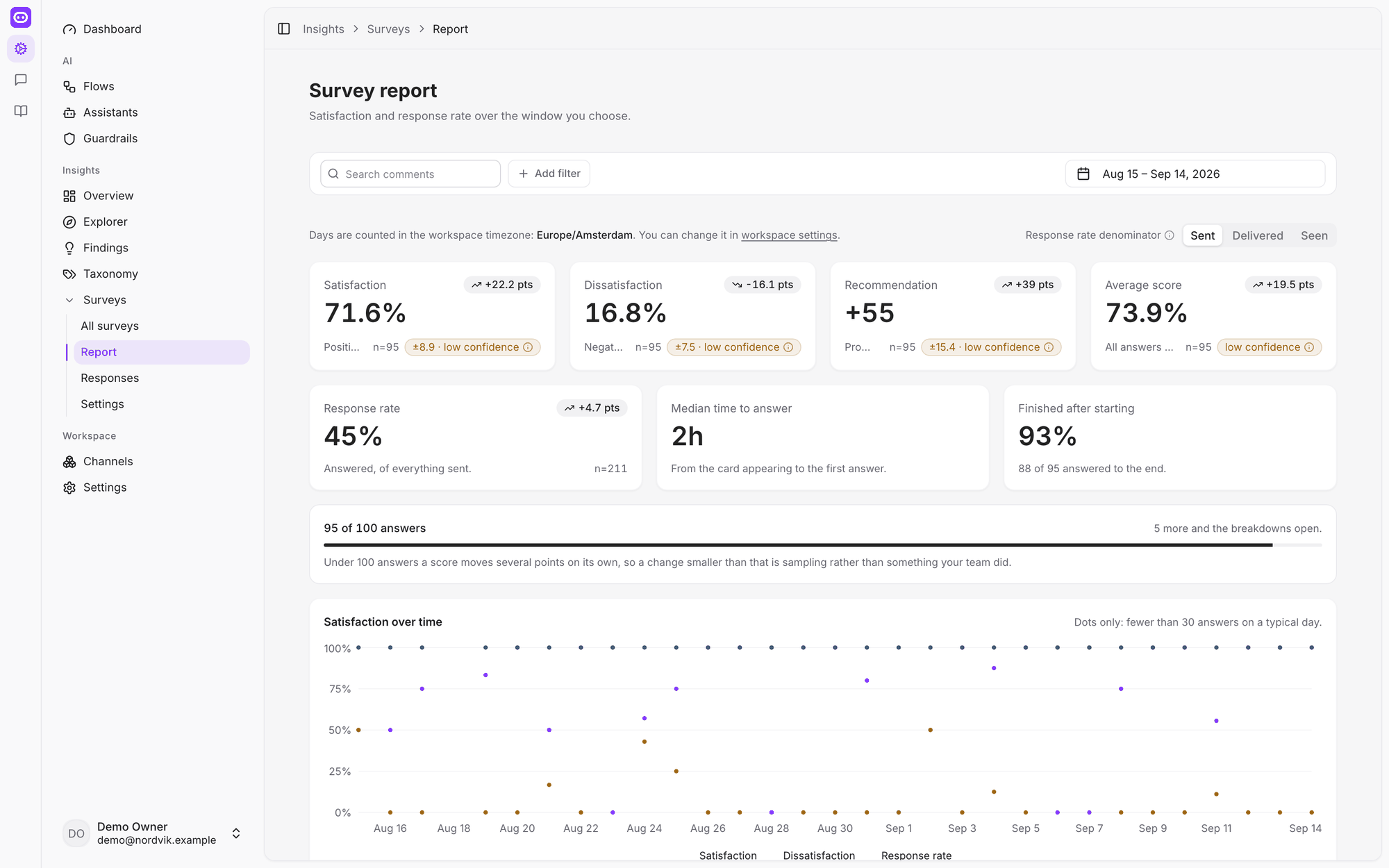
The survey report showing satisfaction, response rate and median time to answer, with satisfaction plotted over a month
Satisfaction, response rate and how long people take to answer.

The report

Satisfaction, dissatisfaction, recommendation and average score, each against the window you choose and the period before it. Response rate can be measured against what was sent, delivered or seen — three numbers that mean different things, and now say which one you are looking at.

We also fixed a typed answer sitting unread in the thread, a customer's near-miss answer ending the survey instead of being asked once more, and surveys recorded as sent on a channel that had never delivered one.

NewImprovedFixed

A new chat widget for your site

A redesigned widget that takes its look from your page, shows products and files properly, behaves on phones, and speaks nine more languages.

The chat bubble on your website has been rebuilt. It is the same product underneath — same settings, same events — but it looks and behaves like something made this decade.

Sites already running the old snippet keep the old widget. To move, copy the new snippet from Channels → your web chat widget → Get embed code and replace the one on your site. Nothing else changes.

It matches your site without being configured

The widget reads the background your page actually paints and picks light or dark to match, before falling back to the visitor's system setting. Your brand colour adjusts to whichever it lands on, so it stays readable in both.

Placement, corner, shape and greeting all come from the channel's settings in the panel, so you set them once where everything else lives.

Messages that are more than text

  • Quick replies — tappable suggested answers under a message.
  • Product cards — three to a view in the expanded panel, swipeable.
  • Image galleries and file cards — attachments that look like attachments.
  • Emoji-only messages are shown big and bare, without a bubble.
  • Survey cards — a rating asked and answered inside the chat.

It behaves on a phone

The panel follows the keyboard instead of hiding behind it, iOS no longer zooms when a visitor taps the message box, and the layout leaves room for the home indicator. Closing shrinks the panel into the launcher rather than blinking out.

Nine more languages, and right-to-left

The widget now ships with nine additional languages and picks one from the visitor rather than the page. It also lays out right-to-left properly, launcher included.

One visitor, one thread per channel

A visitor who has your widget on two sites, or a widget alongside another channel, no longer sees threads bleed between them. Each widget answers for its own conversations, on one identity.

We also fixed the launcher drifting out of its corner, a closing animation that started from nothing, chat history vanishing after a throttled browser tab, and the launcher sitting on top of a sticky footer — Launcher height now lifts it clear.

NewImprovedFixed

Browse live results, page by page

Product and API results now flow into paginated choices and WhatsApp carousels, with clearer language and inbox context.

Browse live results, page by page

Search results can now go straight into a choice or carousel message. Customers see a useful first page and can ask for more instead of receiving the whole list at once.

Live results, ready to browse

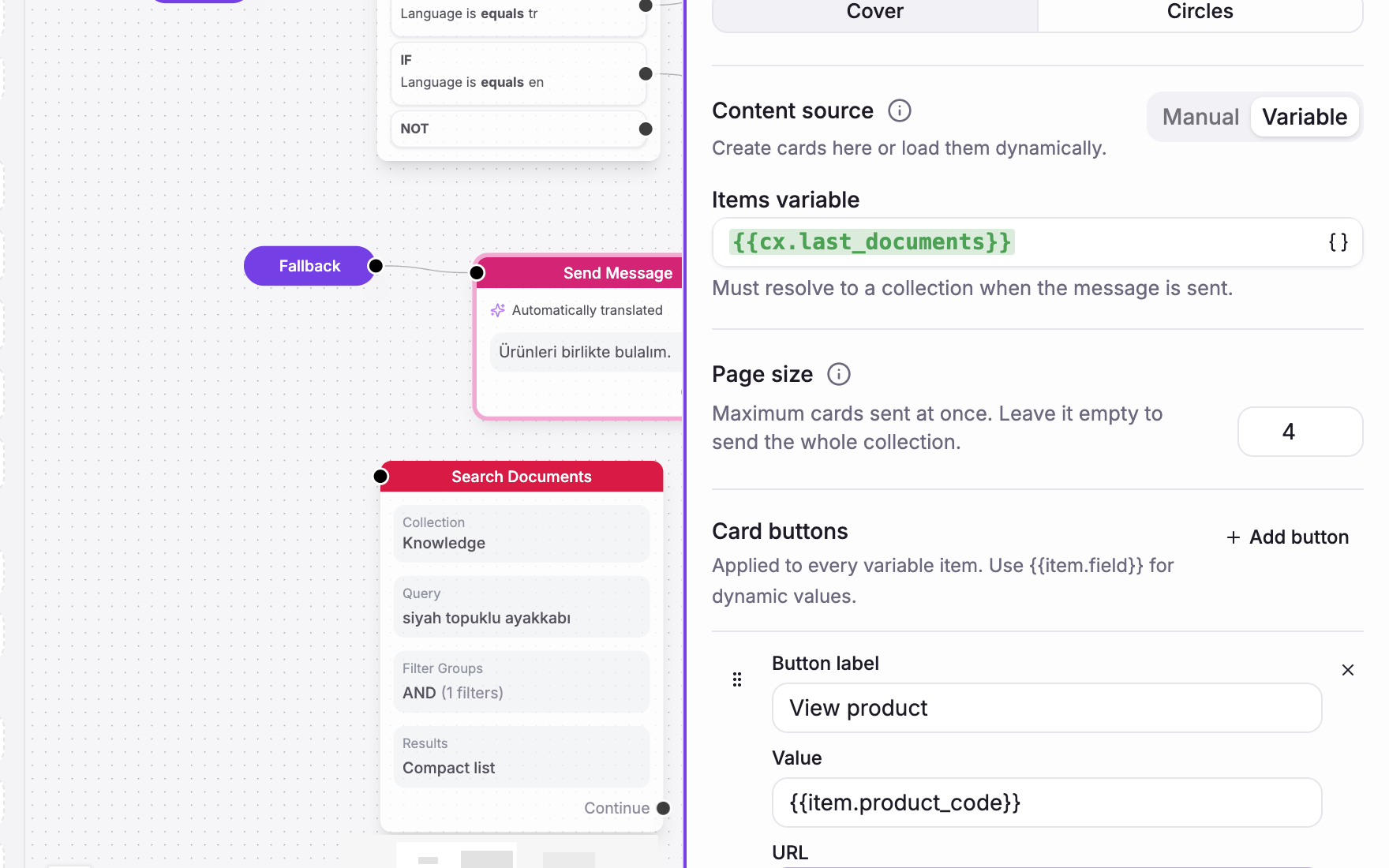
Choose From variable in Send Message to turn a catalog search, document lookup, or API response into cards or choices. You can define card buttons once and fill their links and values from each result.

Pagination keeps the same result set between pages, so “Show more” continues where the customer left off without running the search again. Flow Builder also warns when a page exceeds WhatsApp's limit of three quick replies or ten cards.

Better on WhatsApp

Connexease now sends one native WhatsApp carousel instead of a separate message for every card. One invalid result no longer drops the whole carousel, and the selected product returns to the correct step in the flow.

The 24-hour service window and delivery updates are now handled consistently for both Connexease and Gupshup.

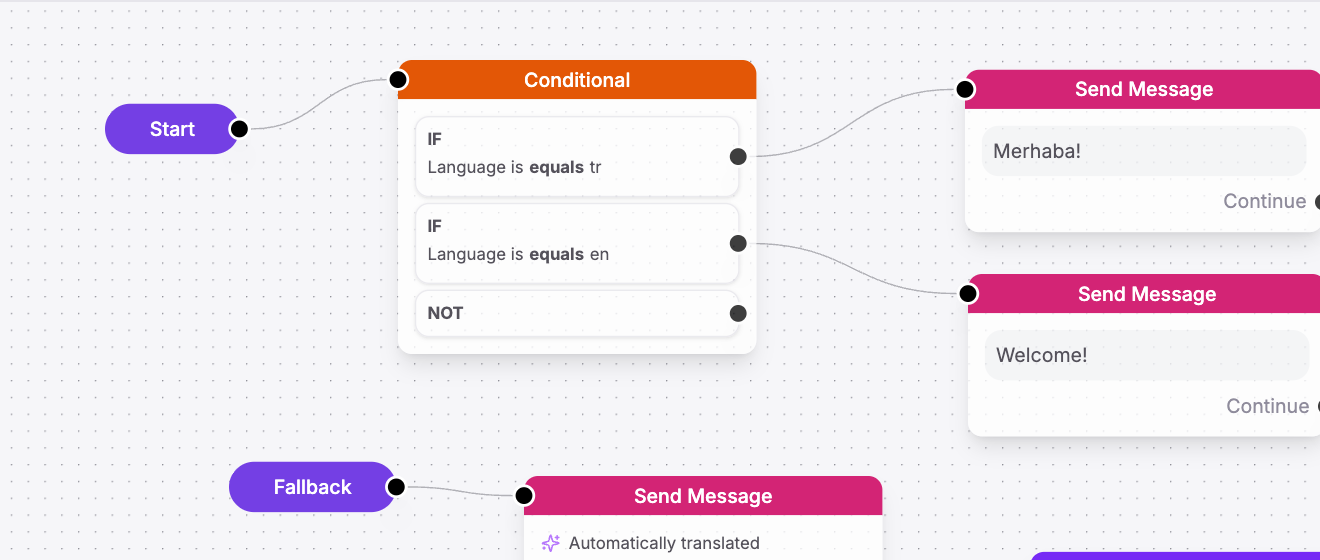
Language from the first step

cs.language can start with the customer's browser language and improve after they write. An explicit language preference always wins, so flows can branch by language from the opening message and Insights gets a more complete language breakdown.

A Flow Builder condition routing Turkish and English customers to matching welcome messages
Choose the opening message from the conversation language.

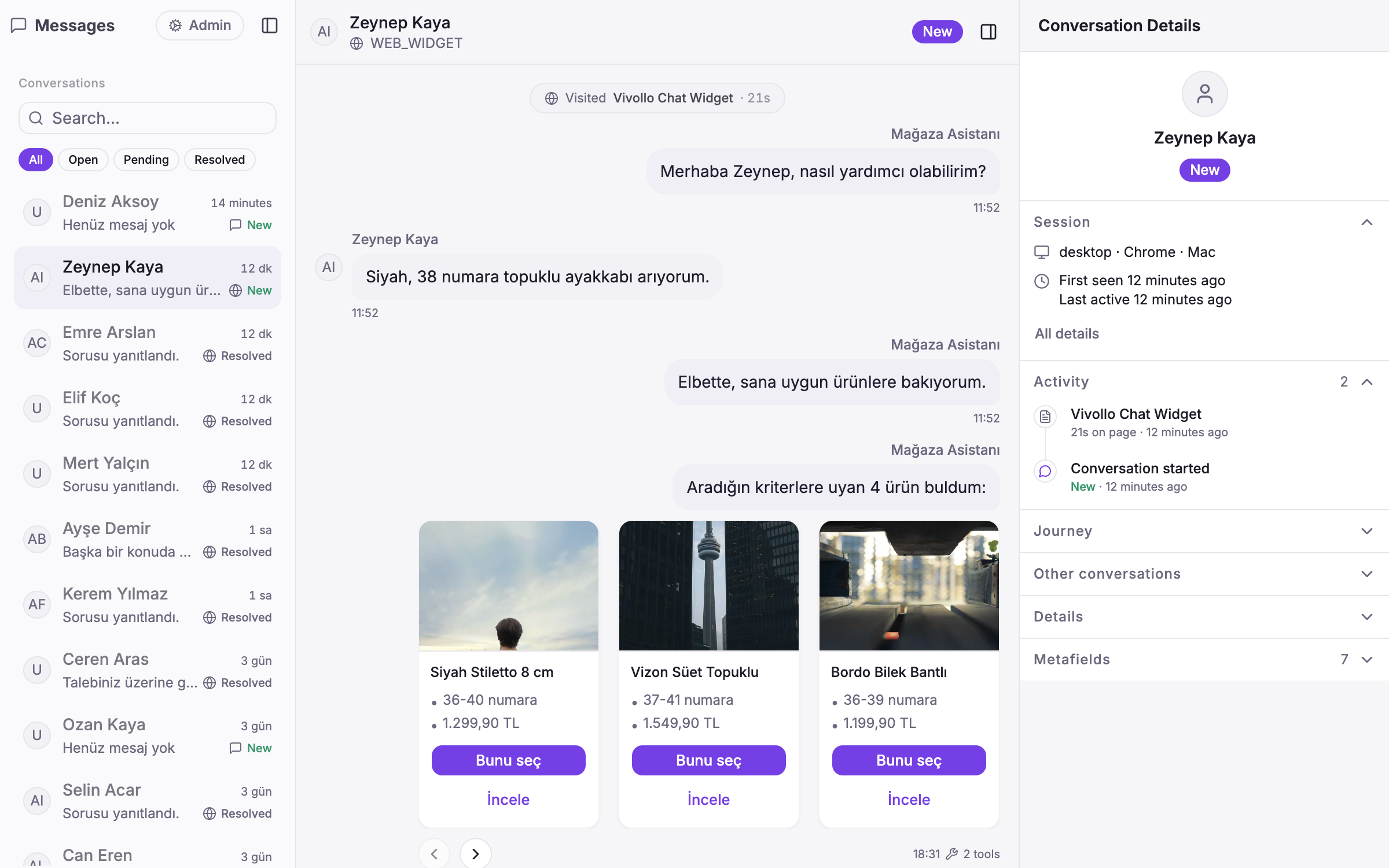
A clearer inbox

The inbox now keeps carousel text, controls, delivery status, and page details together. Team members can also open an AI message's tool run when they need more context about how an answer was produced.

Vivollo inbox showing a demo product carousel, delivery context, and AI tool count
Carousel content and AI context stay with the conversation.

We also fixed stale content in the Send Message editor, carousel selections with repeated button labels, and Ticimax color and size searches.

New

Conversation Intelligence: understand what every customer is really asking

Insights now classifies every conversation across the dimensions that matter, lets you drill into any segment, and turns recurring blind spots into knowledge-base drafts.

Conversation Intelligence: understand what every customer is really asking

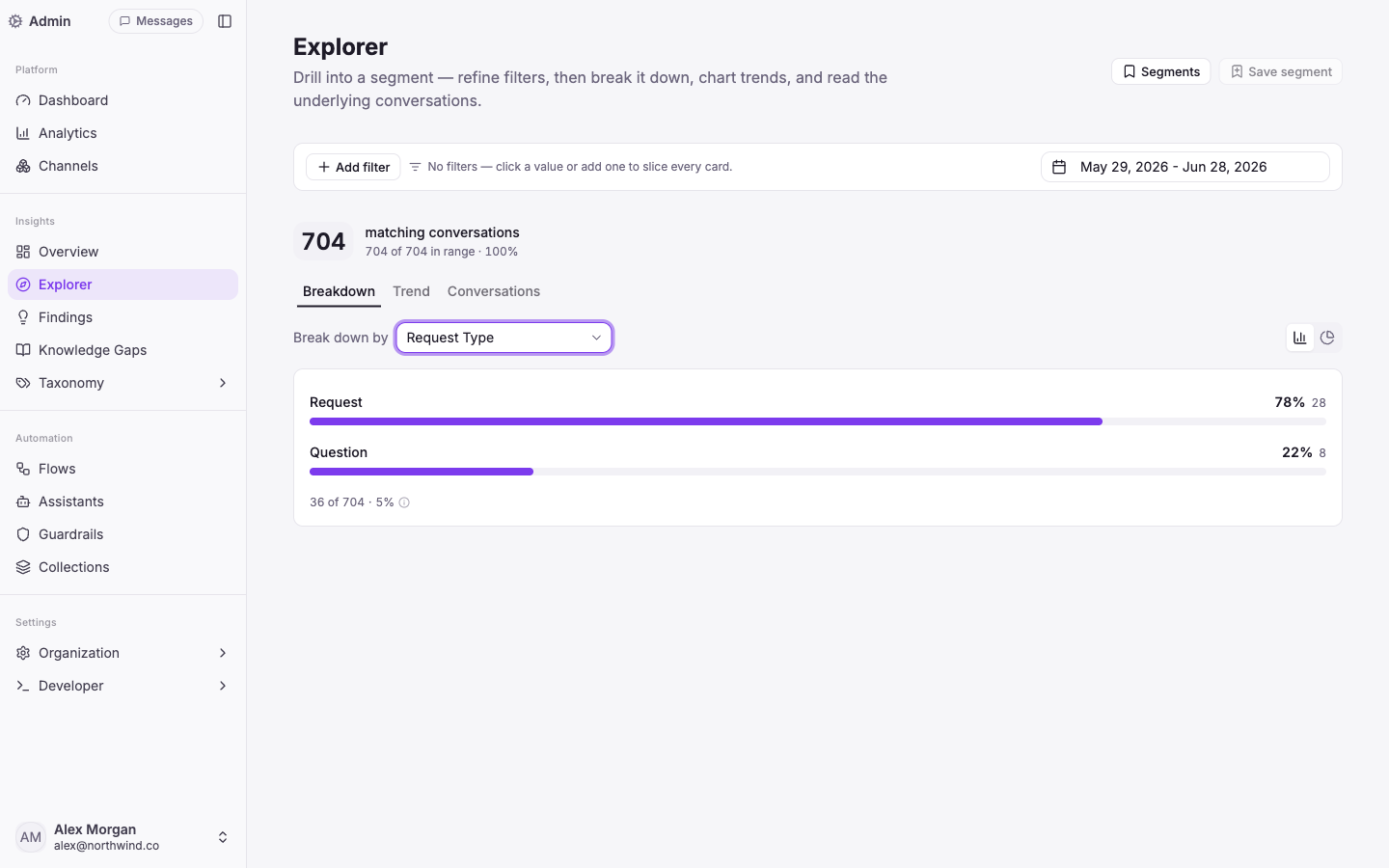
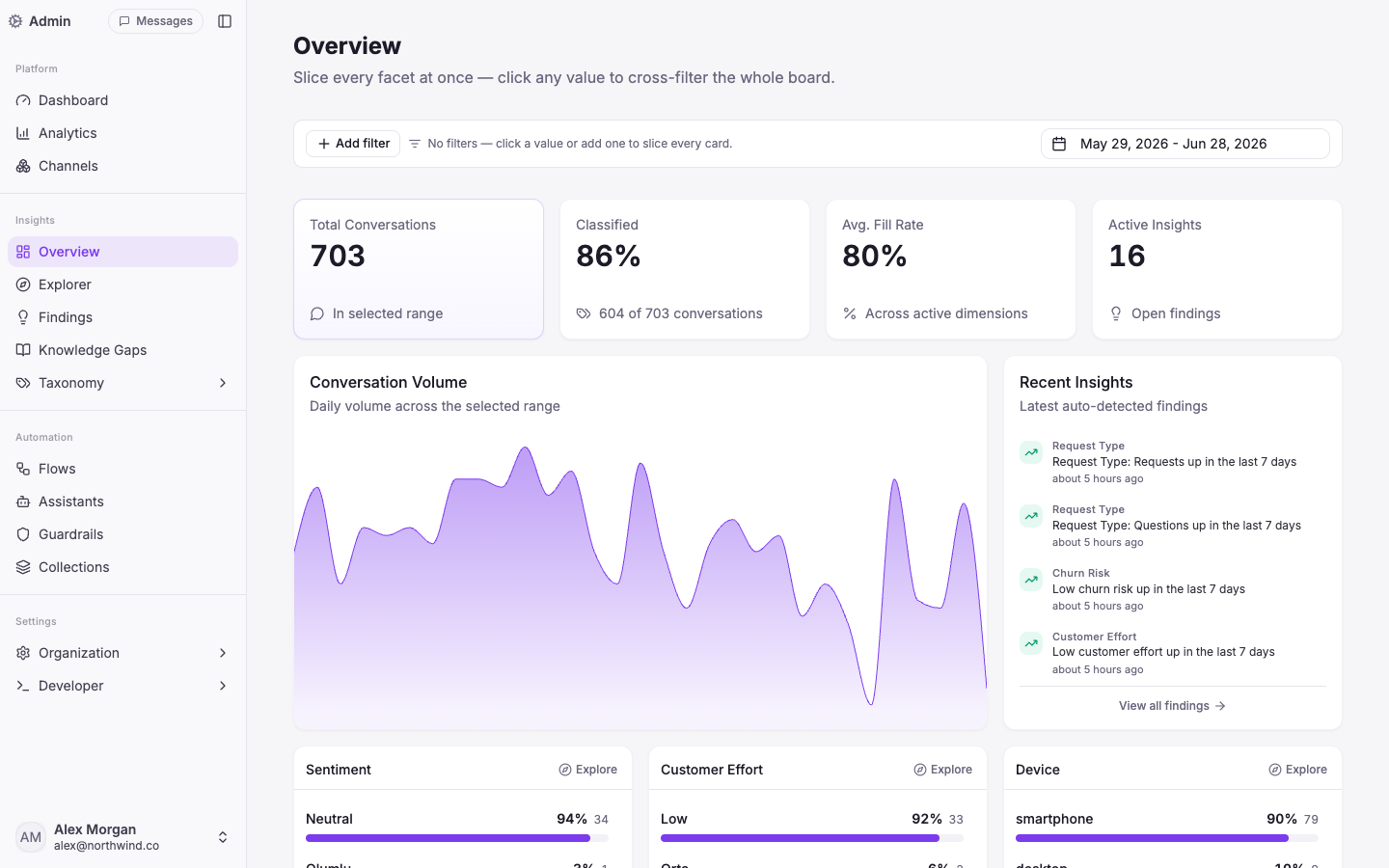
Volume charts tell you how much. Conversation Intelligence tells you what about — and what to do next. Every conversation is now auto-classified across request type, topic, sentiment, language, churn risk and customer effort, so the patterns surface on their own.

Drill into any segment

Start from a number and follow it down. Explorer lets you break any segment down by a dimension, chart how it trends, and read the actual conversations behind it — then save the segment to come back to it.

Insights overview with auto-classified conversation dimensions and recent findings
Overview · slice every facet at once; Recent Insights flags shifts before you go looking.

The Overview board lays out every facet at once — click any value and the whole board cross-filters to it. Findings runs in the background and surfaces trends, shifts and correlations automatically, so a spike in "Issue" or a drop in sentiment reaches you without a manual query.

Close the loop on what you don't know

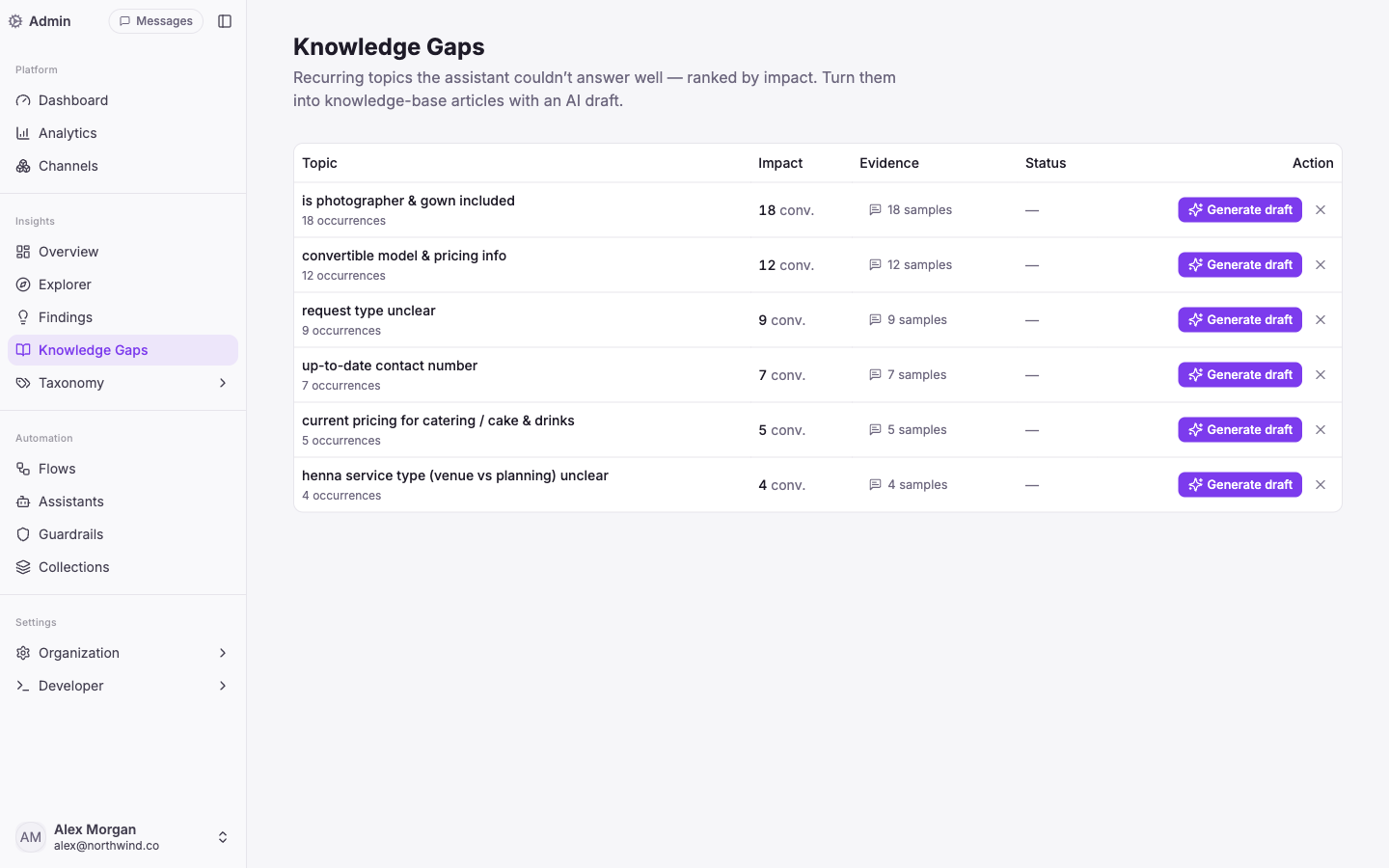
When the assistant repeatedly can't answer something well, that's a Knowledge Gap — ranked by how many conversations it touches. One click drafts a knowledge-base article from the real examples, ready for you to review and publish. Your assistant gets measurably better from its own blind spots.

Knowledge Gaps ranked by impact with one-click AI draft generation
Knowledge Gaps · recurring unanswered topics, ranked by impact, one click to an AI draft.

It all runs in your workspace language — the AI's output and the built-in dimension labels are localised per tenant.

This is the difference between a dashboard you glance at and an analytics layer that actually changes what your agent knows.

New

Commerce, deeper: WooCommerce, live catalog and precise filtering

WooCommerce joins Shopify, Ticimax and Trendyol — with live catalog and order actions — and the agent can now filter your catalog by what matters, not just keywords.

WooCommerce is now a first-class integration, alongside Shopify, Ticimax and Trendyol. The agent works from your live catalog — real products, prices and stock — and can handle order status, cancellations and refunds, verifying the customer by email and order number first.

Search that narrows, not just matches

Your catalog is more than a wall of text. The agent can now filter results by typed fields — variant/SKU, price, capacity, location, budget — so "a venue in Chicago under $2,000 for 150 guests" returns the right options instead of a keyword soup. Vertical templates (retail, listings, services) shape each catalog to its domain.

The result: product answers that feel like a knowledgeable salesperson — grounded in what you actually have in stock.

New

Vision: the agent can see customer photos

When a customer sends a photo, the agent actually looks at it — so 'do you have this?' or a snapshot of the problem just works.

Customers don't always have the words — sometimes it's easier to show you. Now when someone sends a photo, Vivollo passes the image to the model so the agent can see it and respond to what's actually there.

Show, don't tell

A shopper sends a picture and asks "do you have this one?"; someone photographs a damaged item, or a screenshot of an error. The agent reads the image in context — alongside the rest of the conversation — and answers, recommends or routes accordingly. Recent images in the thread come along too, so follow-up questions still make sense.

Part of the same agent

Vision plugs into the same agentic loop as everything else, so a photo can kick off the same next steps as a typed message — catalog search, an order lookup, or a handoff to your team.

Fewer "can you describe it?" round-trips; faster resolutions.

New

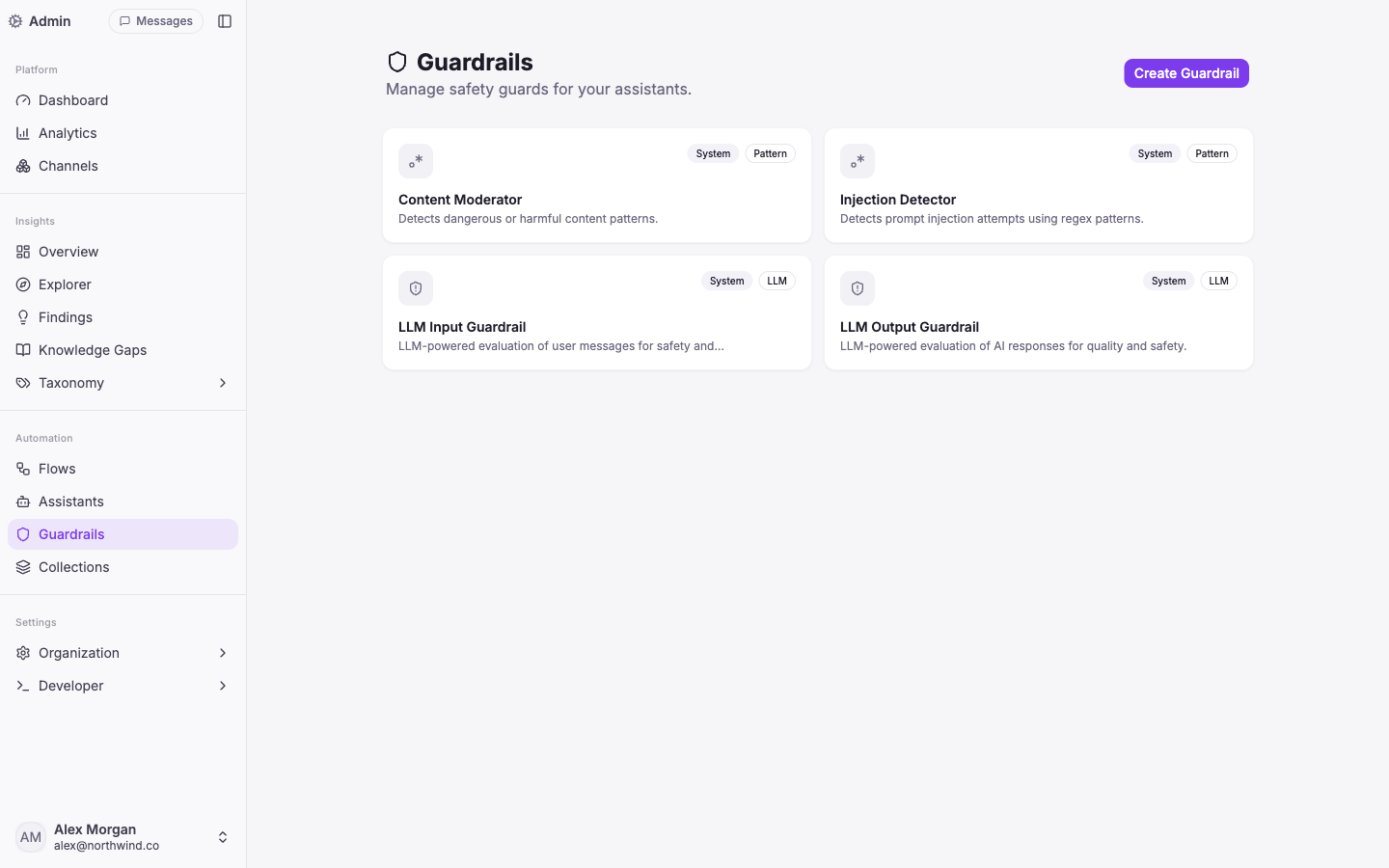
Guardrails: keep every answer safe, on-brand and on-topic

Layered safety checks on what comes in and what goes out — pattern, PII redaction, prompt-injection and LLM-based — so your agent stays compliant and on-message.

Guardrails: keep every answer safe, on-brand and on-topic

Letting an AI talk to your customers means setting boundaries it can't cross. Guardrails run on both sides of every turn — the customer's message on the way in, and the agent's reply on the way out.

Layered protection

  • Pattern — catch dangerous or unwanted content with regex rules.
  • PII redaction — detect and mask emails, phone numbers, cards, national IDs (incl. TC Kimlik), IBANs and more, so sensitive data never lands in your logs (KVKK / GDPR).
  • Prompt-injection detection — spot attempts to hijack the agent's instructions.
  • LLM-based — judge tone, safety and quality against your own rules, and route off-topic messages away.

Checks are streaming-safe, so nothing slips through while a reply is still being typed out.

On by default, yours to extend

Vivollo ships with system guardrails — content moderation, injection detection, and LLM evaluation of both user messages and AI responses — and you can add your own per assistant.

The point: an AI you can put in front of customers without holding your breath.

New

Live handoff: pass the conversation to a human — with the full story

When a moment needs a person, the agent escalates and your teammate picks up with the entire context already in hand — history, memory, customer and journey.

The agent now knows when to step back. Mid-conversation it can trigger a handoff with a written reason, and the conversation moves into your team's inbox — with no cold restart for the customer.

The human picks up where the AI left off

Whoever takes over sees the whole story: the full message history, what the agent remembered about the customer, who the visitor is, and the journey that brought them here. They reply in the same thread — nothing is lost in the handover.

Automation can resume

Once the person is done, the agent can take the conversation back and carry on. And if you run support through Connexease, a handoff can assign the conversation to the right agent or group there, with two-way sync.

Routine stays automated; the moments that need a person get one — seamlessly.

New

Auto-translate: reply in every customer's language

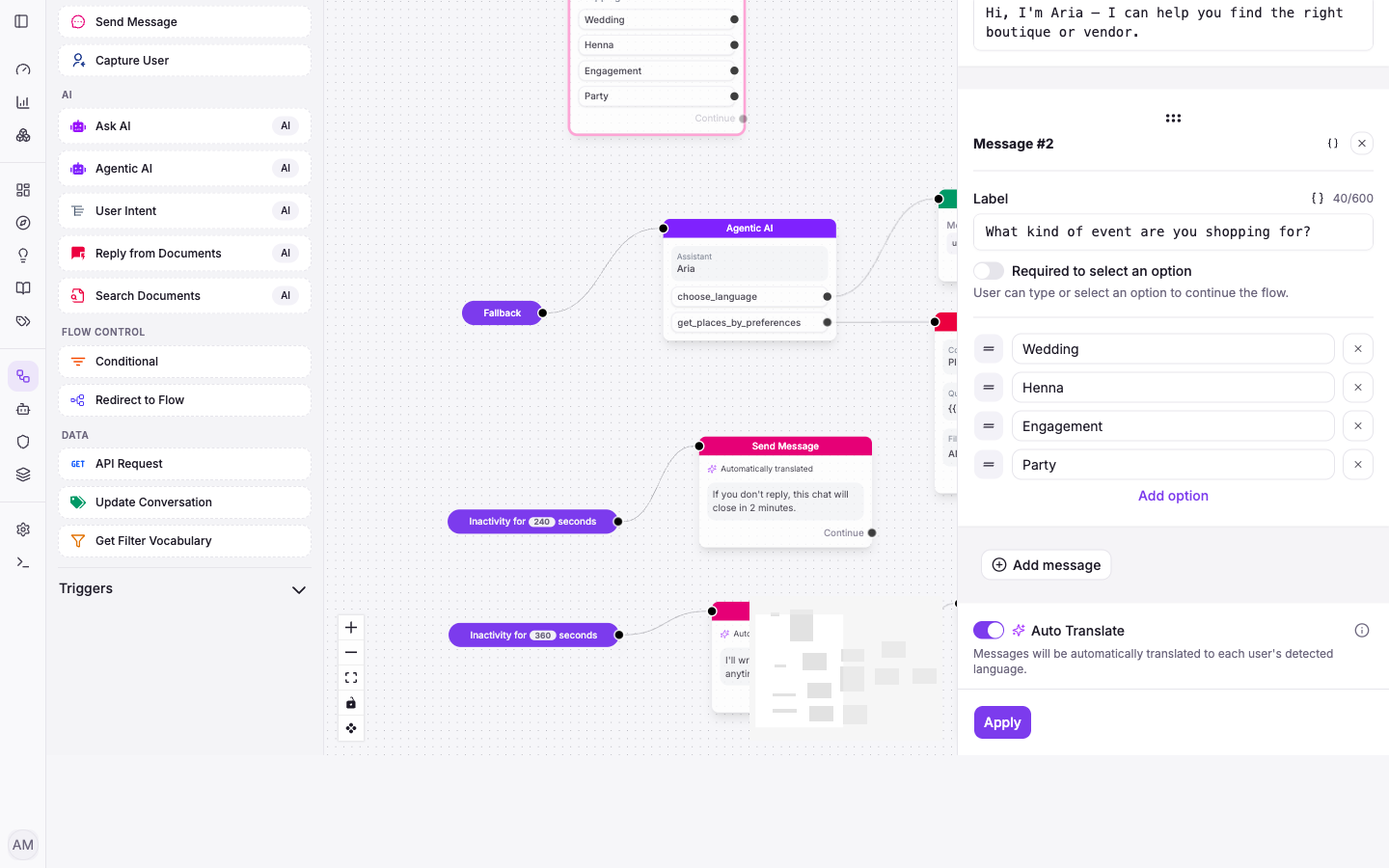
Flip one switch on a Send Message step and your agent detects each visitor's language and answers in it — no separate flows per market.

Auto-translate: reply in every customer's language

Selling across borders shouldn't mean building a separate flow for every language. Auto Translate detects the language a visitor is writing in and translates your agent's replies into it automatically.

One toggle, on any message

It's a switch on the Send Message step. Turn it on and that message — and the agent's responses around it — go out in each visitor's detected language, while you author everything once in your own. Turn it off and messages send exactly as written.

That means a single flow serves a customer in English, the next in German, and the next in Turkish — each in their own words, with no extra setup. The visitor's language is detected from their own messages, so there's nothing for them to pick.

v1.0
New

Meet Vivollo: one agentic AI for every customer conversation

Where it all begins — an agentic assistant that holds real conversations across your channels, acts with tools, and is composed on a visual canvas. No code required.

Meet Vivollo: one agentic AI for every customer conversation

This is the start of the Vivollo changelog — where we'll log every release, improvement and fix from here on. To kick it off, here's the platform we set out to build: an agentic AI for customer support and sales that does more than answer — it acts.

One inbox, every channel

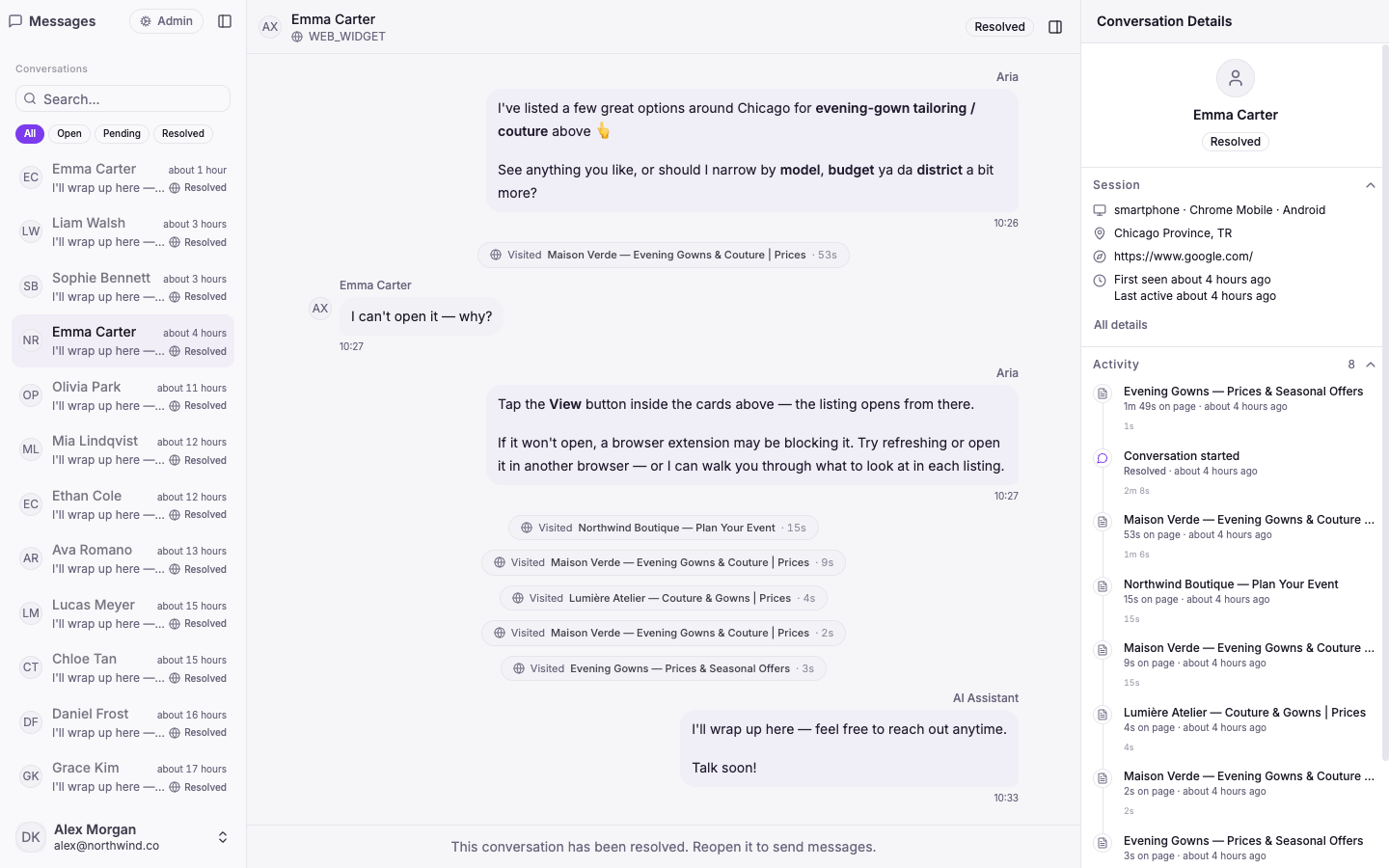
Your whole team works from a single, shared inbox. Conversations from your website widget and WhatsApp land in one place, and each one carries the full picture — who the visitor is, where they came from, what they've browsed, and every step the agent took.

The screenshot above shows a live shopping chat: the assistant surfaces product cards, narrows by budget and location, then closes out cleanly — with the visitor's session and journey on the right.

An agent that acts, not just chats

Vivollo runs a real agentic loop: mid-conversation it can search your catalog, look things up, read your documents, remember the customer across visits, and take the next step — instead of replying from a fixed script. It answers in your customer's words and keeps context the whole way through.

Build automations visually

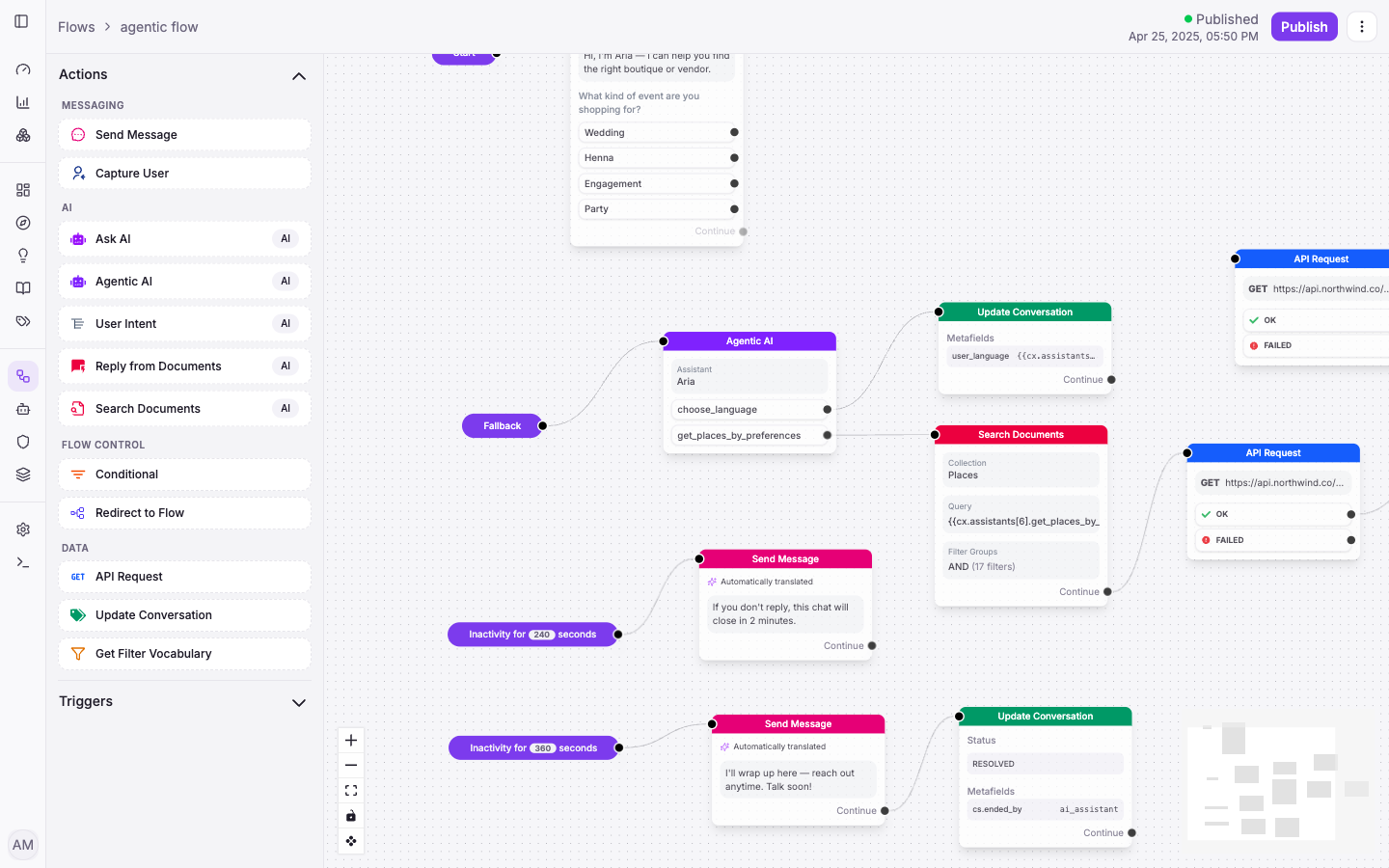
The flow builder is a drag-and-drop canvas for designing exactly how your agent behaves — send messages, capture details, call your APIs, search documents, ask the AI, branch on conditions. No code required.

Vivollo visual flow builder canvas with connected nodes
Flows · compose agent behaviour on a visual canvas — messaging, AI, data and flow control.

Answers grounded in your truth

Point Vivollo at your website, docs and catalog and it answers from your content — with hybrid search over a vector store — so replies are accurate and sourced, not made up.

Know your numbers

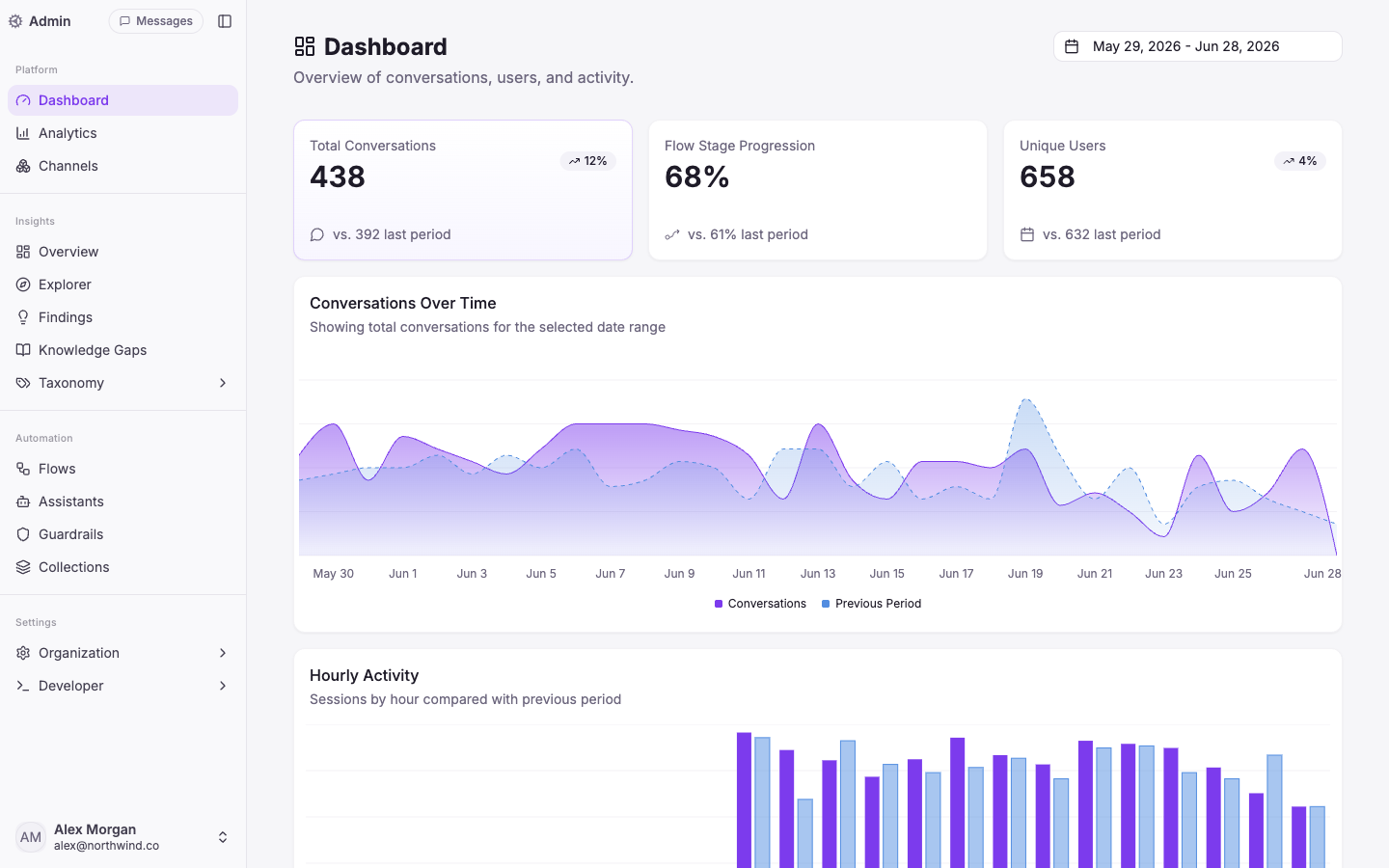
A dashboard tracks conversations and unique users over time, so you can see the impact at a glance.

Vivollo dashboard with conversation volume and activity charts
Dashboard · conversation volume, users and activity over time.

The building blocks

  • Channels — connect a web widget and WhatsApp, each wired to its own flow.
  • Assistants — define agents with their own role, instructions and knowledge.
  • Collections — organise the documents and catalog your agent answers from.

This is day one. Everything above in the timeline is what came next.