
Your help center was written for humans. Rewrite it for AI
The gap between a 40% and a 66% AI resolution rate is usually your help center, not the model. How to rewrite your content so an agent can retrieve and act on it.

If your AI agent resolves 40% of chats when it could be resolving 66%, the difference is almost never the model. It's what the agent can read. And the single biggest fix is the least glamorous one: your help center was written for a human who skims — an agent retrieves differently, and most help content quietly breaks that.
Get the content right and the same agent that was guessing starts answering — one of our fashion stores, İnce Topuk, resolves 66% of its WhatsApp conversations without a human; Turna runs at 72%. Neither needed a smarter AI. They needed content an agent could actually retrieve. Here's how that content is different, and how to rewrite yours.
Your AI reads your help center differently than a person does
A human lands on a 2,000-word "Shipping & Returns" page, skims the headings, and jumps to the paragraph they need. An AI agent doesn't. It runs retrieval-augmented generation (RAG): it splits your page into short passages, fetches the few that best match the question, and answers from those — not from the whole page.
Two things follow directly, and they decide whether your content works:
- It retrieves a passage, not a page. Under the hood, long prose is chunked into passages; the agent pulls the matching chunk and reranks for the best fit. If the answer to "do you ship to Cyprus?" is only implied three paragraphs into a wall of text, the passage that surfaces may not actually contain it.
- It matches meaning and words. Good retrieval is hybrid — semantic (vector) search for meaning, plus keyword (BM25) search for the exact SKU, size, or policy term. That's how "suede boots 38" and "do the tan booties come in a 38" both find the right product. But hybrid retrieval can only rank what you've written down clearly; it can't recover an answer that isn't there.
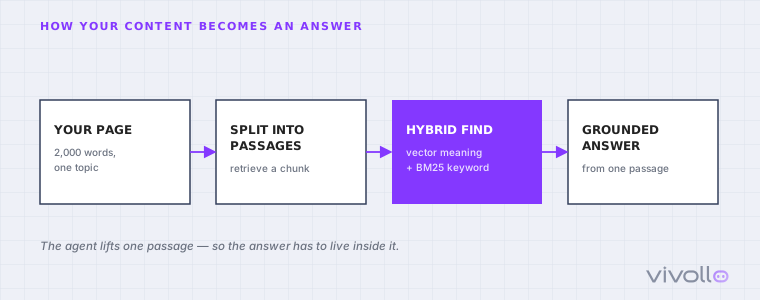
The practical takeaway is uncomfortable but freeing: you're not writing for a reader who will scroll and interpret. You're writing for a retriever that lifts one passage and quotes it. That changes how a page should look.
What a page written for retrieval looks like
Retrieval-friendly content follows a handful of rules that also happen to make it better for humans. The shape matters more than the length:
- One question, one self-contained answer. Each distinct question gets its own section with the answer stated first, in full, without depending on the paragraph above it. "Returns are free within 30 days of delivery for unworn items" beats a policy you have to assemble from three sentences.
- Kill the ambiguity a human would infer. People fill gaps from context; a retriever won't. Replace "our usual timeframe" with "2–4 business days." Name the exception ("final-sale items can't be returned") instead of leaving it implied.
- Spell out the terms customers actually type. Expand acronyms, include the brand and product names, and use the customer's word and yours ("delivery / shipping", "refund / money back"). Keyword retrieval rewards the match.
- Put it where the agent can reach it. An answer that only exists in a supplier PDF, an old email thread, or a staff member's head can't be retrieved. If it matters, it has to be ingested text.
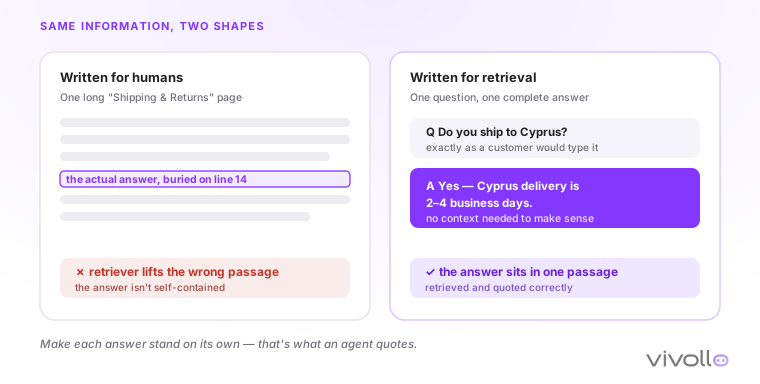
None of this means dumbing content down. It means making each answer stand on its own — which is exactly what an answer engine quotes, and increasingly what Google's AI results surface too.
Three reasons the answer isn't there at all
Before you rewrite anything, sort your failures. When an agent can't answer, it's one of three problems — and only two are content problems:
- The answer was never written down. The 30-day return exception, the fit note for a wide foot, the "we don't ship batteries" rule — it lives in your team's memory, not a page. No retriever can surface what doesn't exist. Write it.
- The answer exists, but the agent can't read it. It's in a PDF spec sheet, a page nothing links to, or a channel you never connected. The knowledge is real but unreachable. Connect it — the Knowledge Engine ingests web pages, WordPress and Zendesk articles, PDFs, and your live catalog, then re-crawls on a schedule so it stays current.
- No document can fix it. "Where's my order?", live stock, refund status — the answer is a database row, not a paragraph. This is a job for an agent that calls a tool, not for your help center.
We wrote the full diagnosis of these failures in why your AI chatbot can't answer. This post is the other half — the fix for problems one and two. Upgrading to a "smarter" model while the answer stays unwritten just buys you more fluent apologies.
Close the loop: let the misses write your next articles
This is the part that turns a one-time cleanup into a system. You don't have to guess which pages to fix — the agent already knows, because it logs every question it couldn't answer.
Our Knowledge Gaps report groups those unanswered questions, ranks them by impact (how often they come up and how badly they derail the chat), and drafts a knowledge-base article for each one, grounded in the real conversations where it failed. You review, edit, and publish — and that question resolves itself the next time it's asked.
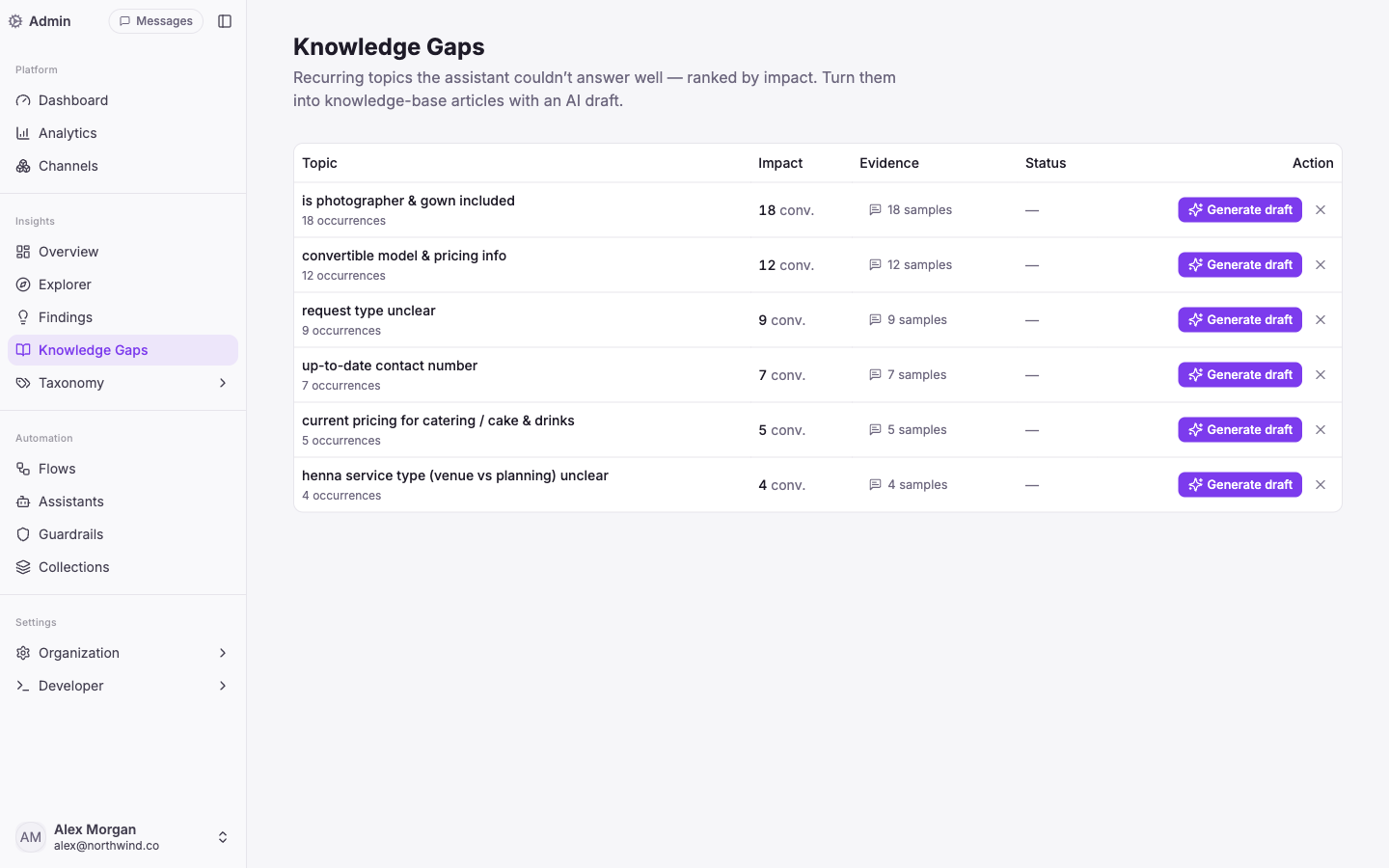
That's the difference between a knowledge base you maintain by intuition and one your customers' actual questions maintain for you. It's also why two stores on the same tool land at 45% and 72%: the one at 72% closed the loop. If you want the honest breakdown of what that ceiling depends on, we cover it in how much support AI can resolve.
Where to start this week
You don't need a content project. You need a first pass and a loop:
- List your ten most-asked questions — pull them from your inbox, not your imagination.
- Give each one a self-contained, answer-first passage on a real page. This alone moves the needle more than anything else.
- Connect your sources — your help pages, PDFs, and live Shopify or WooCommerce catalog — so the agent reads your truth, not its training data.
- Run it for two weeks, then read the Knowledge Gaps report and fix the top five. Repeat.
This is the same grounding work behind every number in our AI customer service guide for small business — the agent is only ever as good as what it can read. If you'd rather not do the first pass alone, that content audit is exactly where we start on support deployments, before anyone talks about going live.
Common questions
- Why can't my AI answer questions that are clearly on my help page?
Usually because the answer is buried in a long page, locked in a PDF, or phrased ambiguously. An agent retrieves a short passage, not a whole page — if the answer isn't self-contained in that passage, it won't surface. The fix is content design, not a smarter model.
- Do I need to rewrite my entire knowledge base for AI?
No. Start with your ten most-asked questions and give each one a self-contained, answer-first passage. Then let the Knowledge Gaps report tell you which pages to fix next, ranked by how often they're actually failing customers.
- Can the AI read my product catalog and PDFs, or just web pages?
Both. The Knowledge Engine ingests website pages, WordPress and Zendesk articles, PDFs, plain text, and live e-commerce catalogs (Shopify, WooCommerce, Ticimax, Trendyol) — and re-crawls on a schedule so answers stay current.
- What about questions no document can answer, like 'where's my order?'
Those aren't a content problem — they're a live-data problem. The agent answers them by calling a tool that looks up the order in real time, not by retrieving a document. Knowing which is which is half the work.
About the author

Davut KemberCo-Founder & Full-Stack Developer
Co-founder of Vivollo, building the agentic support platform end to end. He writes about the engineering reality of AI agents that take real actions — and what actually moves resolution rates and reply times.
Davut Kember →Keep reading
AI customer service for small business: what AI handles, what you keep
An AI agent resolves 66–72% of a small store's conversations — orders, sizes, returns — so a team of 1–5 covers the rest. What works, and how to start.
AI customer service for WooCommerce: what actually works
WooCommerce is self-hosted, so the win isn't the platform — it's connecting AI to your live orders and catalog. What an agent reads, writes, and resolves.
Intercom Fin alternative for small business (2026)
Fin is capable — but per-resolution pricing means you pay more as it works better. When that math turns against a small store, and what to look for instead.