API keys
Create and manage the credentials your code uses to talk to Vivollo securely.
An API key is the credential your code uses to prove it's allowed to talk to your Vivollo workspace. Anything programmatic — querying the REST API, pushing documents into a collection, or authenticating a script — starts with one. This page covers creating, using, and looking after them.
Creating a key
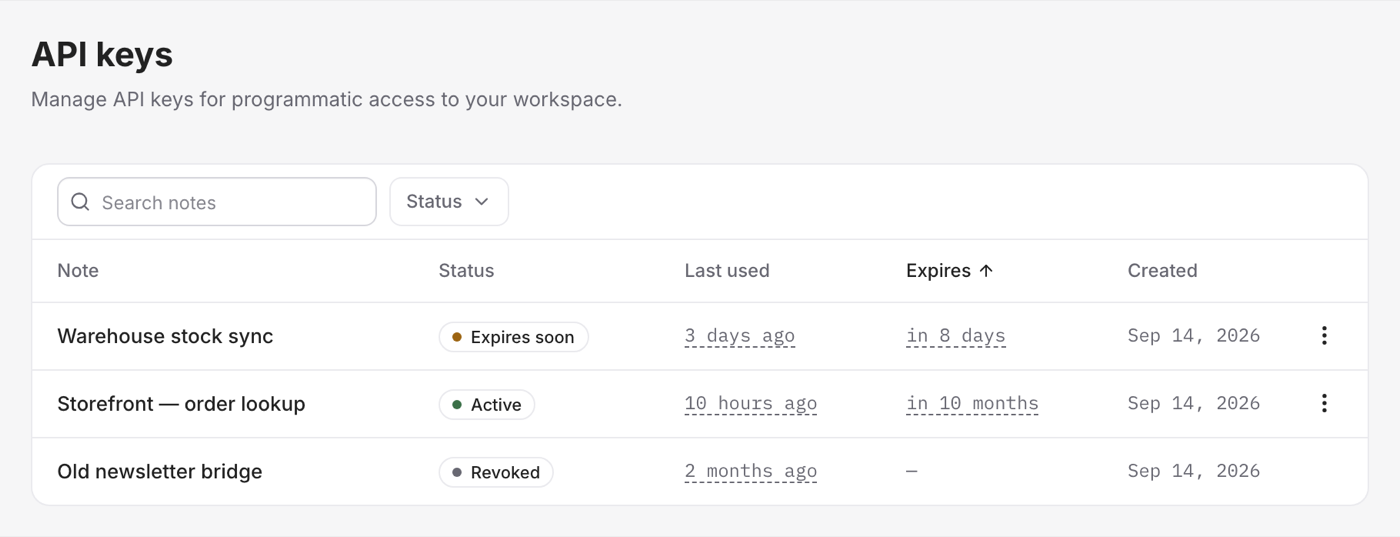
In the Developer area, create a new API key and give it a clear description so you remember what it's for later — "data-warehouse sync", "CMS publisher". When the key is created, you'll be shown its token.
You can also set an expiry on a key, so it stops working after a date you choose — handy for temporary access or for rotating credentials on a schedule.
Treat an API key like a password — because that's exactly what it is. Copy it somewhere safe the moment it's created, never commit it to your codebase or share it in a message, and if you suspect one has leaked, revoke it immediately and create a fresh one.
Using a key
To authenticate a request, send the key as a bearer token in the Authorization
header:
Authorization: Bearer YOUR_API_KEYThat's it — every request carrying a valid key acts within your workspace, scoped to your data and nobody else's.
Managing your keys
From the Developer area you can keep your keys in order:
- See them all — every key, with its description, and when it was last used (a quick way to spot keys nothing relies on anymore).
- Revoke a key — delete it the instant it's no longer needed or might be compromised. Revoking takes effect immediately; any code still using that key will stop working, so swap in a new one first.
Good habits
A few practices keep your integration secure and tidy:
- One key per integration. Separate keys for separate jobs mean you can revoke one without breaking the others, and you always know what a key is for.
- Rotate periodically. Replace long-lived keys now and then, using expiry dates to make rotation routine rather than an emergency.
- Prune the unused. If a key hasn't been used in ages, it's probably safe — and safer — to revoke it.
How many keys you can have
The number of API keys you can keep active is part of your plan. If you hit the limit, revoke a key you no longer need or check Plans & limits.
With a key in hand, you're ready to connect — either by reacting to events or querying the API.