
Localization
Set your workspace language, reply in each customer's language, and use language in flows and Insights.
Vivollo can run one flow for customers who speak different languages. You choose the language your team works in, while each conversation keeps its own customer language.
Set your workspace language
The panel itself is available in English and Turkish. Choose yours under Settings → General (see Organization settings).
One setting covers three things:
- the language your team sees the panel in,
- the language the AI starts in — a customer who writes in another language is still answered in theirs,
- the names of the built-in Insights dimensions. Changing the language renames them; conversations already classified keep the values they have.
Use the conversation language
cs.language is the current language of a conversation. You can use it in a
condition, a message, or an Update conversation step.
Vivollo chooses the language in this order:
- A language the customer or your team selected.
- The language detected from the customer's messages.
- The browser language reported when the conversation started.
A selected language is never replaced by automatic detection. If Vivollo does
not have any of these signals, cs.language stays empty.
Use us.language when a known customer's choice should also be used in
future conversations.
Start a flow in the right language
Add a Conditional after the start of the flow:
cs.language = Turkish  → Turkish welcome
cs.language = English  → English welcome
cs.language Is empty   → Default welcome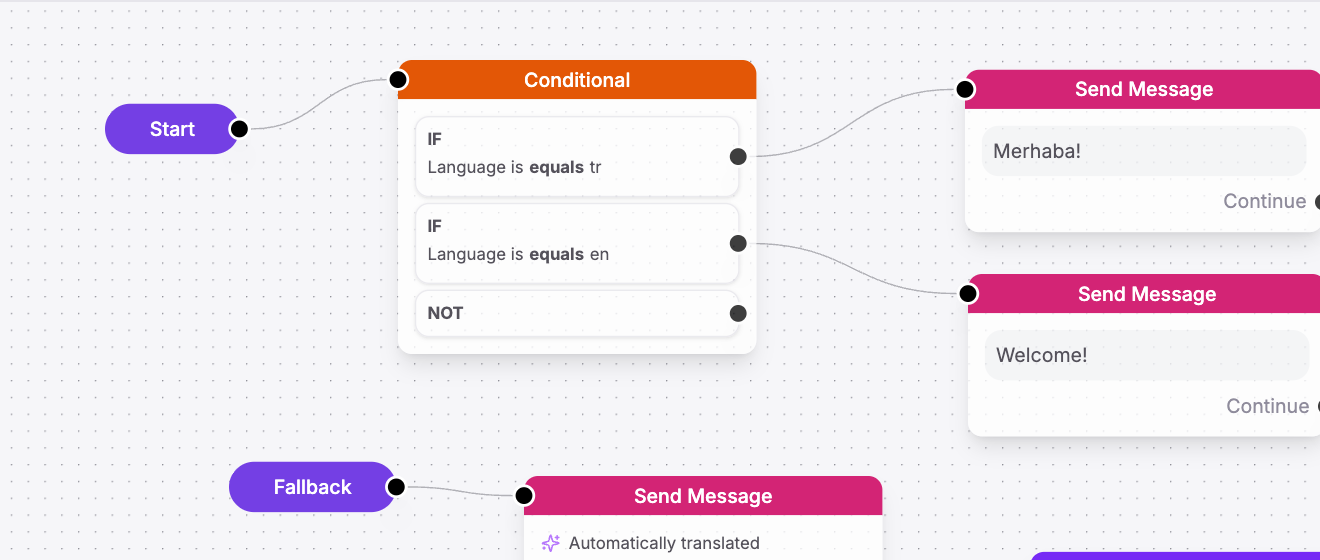
Choose the language by name in the editor. Always add an Is empty path for channels that do not provide a language yet.
Translate replies automatically
Turn on Auto-translate in Send message to translate a flow message into the conversation's current language. You can keep one flow instead of maintaining a copy for every language.
The web widget speaks eleven languages of its own — its buttons, prompts and placeholders — and picks the one that matches your page or the visitor's browser. Visitors can switch it themselves, and that choice is remembered. See Web widget.
See languages in Insights
Insights uses the same conversation language. You can compare topics, sentiment, and results across languages, including conversations whose language was known before the customer wrote.