Vivollo

Quickstart

Go from an empty account to a live AI agent answering real customers — in about ten minutes.

The fastest way to understand Vivollo is to watch it answer a real question. So let's not theorize — let's get an agent live. This guide takes you from a fresh account to a working agent on your website in about ten minutes.

Here's the whole journey at a glance:

  1. Connect a channel
  2. Give the agent some knowledge
  3. Point a flow at it
  4. Try it, then turn it loose

We'll do them one at a time.

In a hurry and on Shopify? When you create your account, Vivollo offers a one-click support template that wires up a working agent — channel, knowledge, and flow — for you. You can take that shortcut and come back here to understand what each piece does.

Step 1 — Connect a channel

A channel is simply where a conversation happens. The quickest one to test with is the website widget, because it needs nothing more than pasting a snippet onto your site.

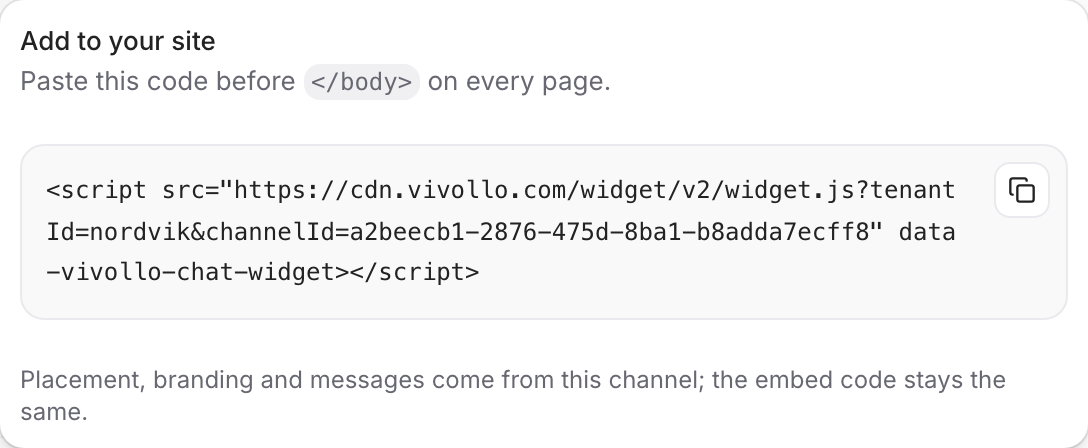
Open Channels in the sidebar, add the Web widget, and you'll get a one-line embed code. Drop it into your site's HTML (just before the closing </body> tag) and the chat bubble appears.

<script
  src="https://api.vivollo.com/chat-widget/widget.js?tenantId=YOUR_TENANT_ID&channelId=YOUR_CHANNEL_ID"
  data-vivollo-chat-widget
></script>

That's your agent's front door. If you'd rather start with WhatsApp or Instagram, see Channels — the idea is the same, the connection just takes a few more credentials.

Step 2 — Give the agent something to know

An agent with no knowledge is a very polite agent that can't help anyone. So let's give it some.

In Vivollo, knowledge lives in Collections. A collection is a tidy, organized home for the things your agent should know — your FAQs, your shipping and returns policy, your product catalog.

Open Collections, create one from the Knowledge template, and add a few sources. You can:

  • Point it at your website so it reads your help and policy pages
  • Import your help center from Zendesk or WordPress
  • Connect your store so it pulls in your live catalog

Vivollo reads, organizes, and indexes everything so the agent can find the right answer in an instant. Add just a couple of things for now — you can always feed it more later. The full story is in Knowledge & Collections.

Step 3 — Point a flow at it

A flow is the conversation's game plan: what happens when a customer says hello. You build it on a visual canvas by dragging in actions — no code.

For a first agent, you need almost nothing:

  1. Find the Fallback — the entry point that handles whatever a customer types.
  2. Connect the Agentic AI action to it — this is the autonomous agent that reads the message, searches your collection, and answers.

That's genuinely it. The Agentic AI action can look up customer context, search your knowledge, remember details, and hand off to a human, all on its own. Later you'll learn to shape the conversation with more actions, but for now, less is more.

Prefer to understand flows before building one? Read Flows overview first — it's a five-minute read and the rest of the panel makes more sense afterward.

Step 4 — Try it, then turn it loose

Before any real customer sees it, talk to your agent yourself. Open the widget on your site (or use the in-panel preview) and ask it the questions your customers actually ask:

  • "What's your return policy?"
  • "Do you ship to İzmir?"
  • "Is the blue one in stock?"

If an answer is off, it's almost always because the agent didn't have that knowledge yet — so add it to your collection and try again. This loop, ask → notice a gap → feed it → re-ask, is how every great Vivollo agent gets built.

When it's answering the way you'd want your best rep to, you're live. Real conversations will start flowing into Conversations, where you and your team can watch, jump in, and take over whenever you like.

What just happened

In four steps you connected a channel, taught the agent, gave it a plan, and put it to work. Everything else in these docs builds on those same four pieces:

  • Channels decide where you meet customers.
  • Collections decide what the agent knows.
  • Assistants & Flows decide how it behaves.
  • Conversations & Insights show you what's happening and help you improve.

Next, let's slow down and look at those core ideas properly, so the rest of the platform clicks into place.

Core concepts