Templates
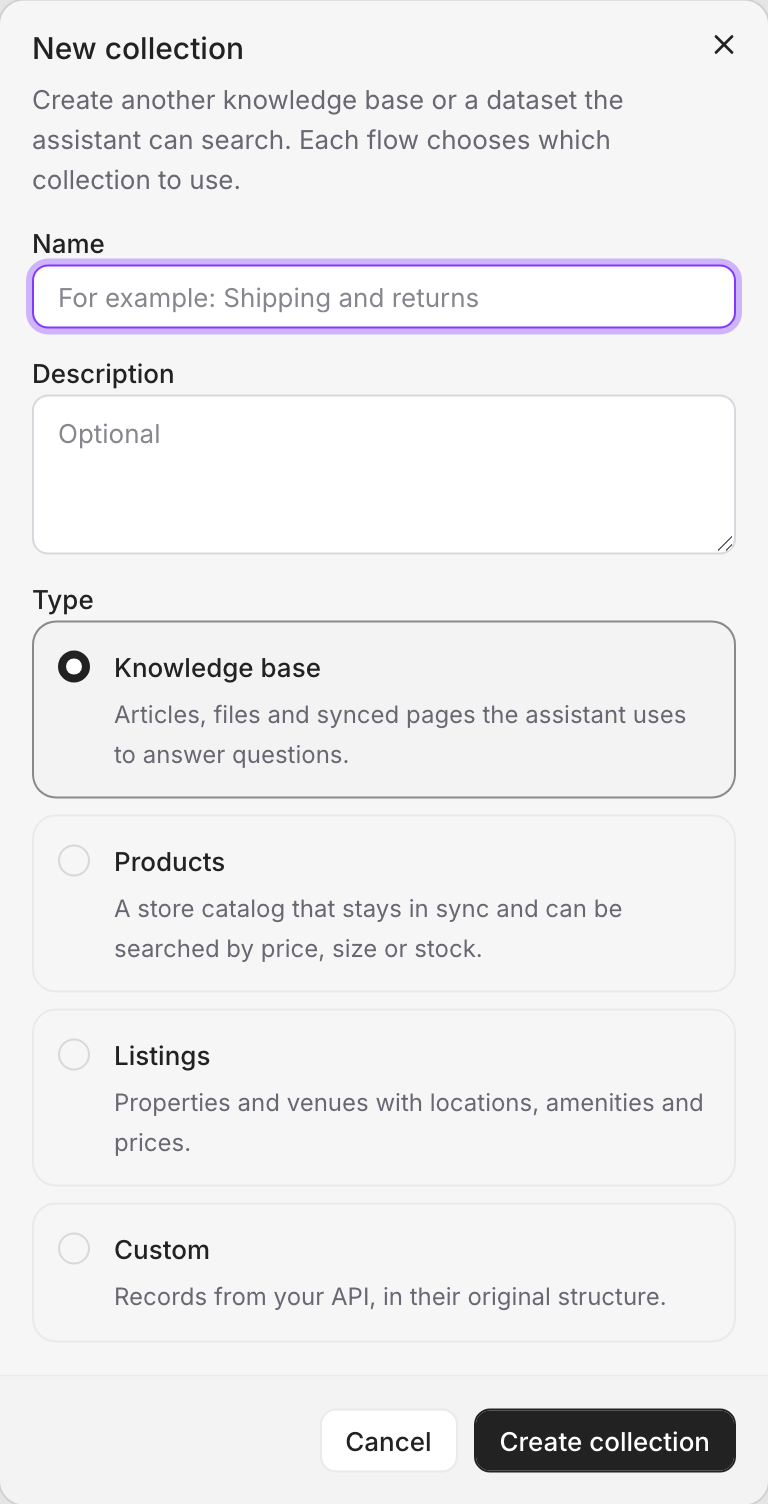
Pick the blueprint that matches your content — Knowledge, Product, Listing, or Custom — and the right fields, search, and filters come preconfigured.
Different kinds of knowledge behave differently. A help article is prose you search by meaning; a product is a structured thing you filter by price and size. A template is a ready-made blueprint that knows the difference — choose one, and your collection arrives with the right fields, the right search behavior, and the right filters already set up.
Picking the template that matches your content does most of the work for you. Here's how to choose.
Knowledge — for prose
The Knowledge template is for written content: FAQs, help-center articles, policies, blog posts, documentation. Anything where the answer is a passage of text.
Behind the scenes, Knowledge collections are tuned for finding the right passage. Long articles are automatically broken into smaller, meaningful pieces, so when a customer asks about one specific thing, the agent retrieves the exact paragraph that answers it — not a whole 5,000-word guide. You can also tag articles with labels to organize and filter them.
Use it for: return policies, shipping FAQs, how-to guides, support docs.
Product — for catalogs
The Product template is built for e-commerce, and it's deeply aware of how products actually work: variants, sizes, colors, prices, stock, SKUs, vendors.
This is the template that powers "do you have this in 38, in blue, under 500 TL, in stock?" It understands that one product comes in many variants, and it lets the agent filter on all of it — price ranges, specific sizes and colors, particular SKUs, in-stock only. When you connect your store, your catalog flows straight into a Product collection, variants and all.
Use it for: any online store catalog (Shopify, WooCommerce, Ticimax, Trendyol, or your own).
Listing — for places and services
The Listing template is for directory-style content: venues, services, places — hotels, restaurants, salons, event spaces. Things with a location, a category, a price, amenities, and ratings.
It adds the fields that matter for this world: city and district, category and sub-category, amenities and features, price, rating. So the agent can answer "a salon in Kadıköy open on Sundays under 1,000 TL" by filtering on exactly those attributes.
Use it for: venue directories, service marketplaces, location-based listings.
Custom — build your own
The Custom template starts blank. There are no preset fields — you define the schema from scratch, choosing each field and its type. It's for knowledge that doesn't fit any of the templates above and needs its own shape.
It's more work than the ready-made templates, so reach for it only when none of the others fit. When you do, Fields & filters explains the field types you can build with.
Use it for: bespoke data structures unique to your business.
Specialized templates
Some templates are bespoke, built in partnership for a specific domain — for example, a dedicated wedding-venue template with its own capacity tiers, budget ranges, and venue categories. These come preconfigured for that exact use case rather than being assembled by hand. If your business has a specialized need like this, it's worth a conversation with the Vivollo team.
Choosing at a glance
| Your content | Template |
|---|---|
| FAQs, policies, articles, docs | Knowledge |
| An online store catalog | Product |
| Venues, services, places | Listing |
| Something with its own structure | Custom |
You can have many collections at once, each with its own template. A typical store has a Product collection for the catalog and a Knowledge collection for shipping and returns — and the agent searches whichever fits the question. You're not limited to one.
Next, let's look at the fields and filters that give a collection its structure — and let the agent search with precision.