Conditions & branching
Send different customers down different paths based on what they've said, who they are, or what you know about them.
Not every conversation should go the same way. A returning VIP and a first-time visitor deserve different greetings. A refund request and a product question belong on different paths. Branching is how a flow makes those decisions.
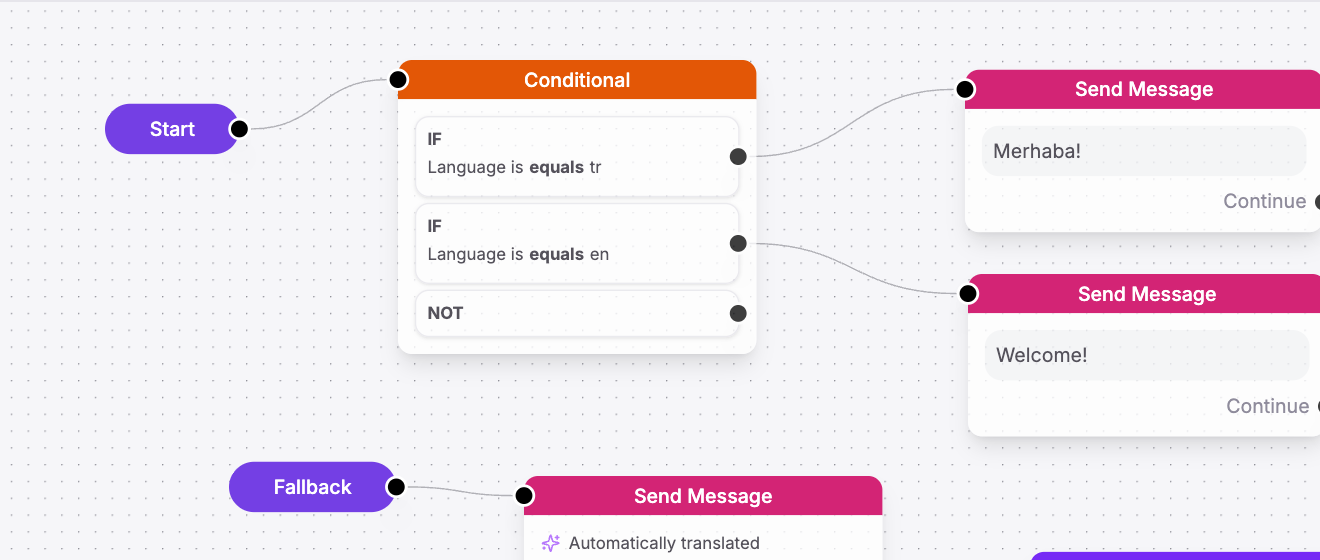
The tool for the job is the Conditional action. It looks at what you know, checks it against rules you set, and sends the conversation down the matching path.
The shape of a decision
A Conditional holds one or more condition groups, checked from top to bottom. Each group says, in effect: "if this is true, go here." The first group that matches wins, and the conversation follows that route. If none match, it takes a default path you define.
Picture routing by what the customer wants:
Conditional
├─ if intent = "refund" → Refund flow
├─ if intent = "shipping" → Order-lookup flow
└─ otherwise → Agentic AI (general help)Each group compares a variable (something you know — a metafield, a captured answer, a detected intent) against a value, using an operator.
Operators: the kinds of checks
An operator is the type of comparison. Vivollo gives you sixteen, covering text, numbers, dates, and presence. You'll recognize most of them instantly:
| Operator | Checks whether the value… | Good for |
|---|---|---|
| Equals / Does not equal | exactly matches (or doesn't) | any type |
| Contains / Does not contain | appears anywhere inside | text, lists |
| Starts with / Ends with | begins or ends with text | text |
| Is empty / Is not empty | has no value (or has one) | text, lists |
| Is present / Is not present | exists at all | selections, users |
| More than / Less than | is bigger or smaller | numbers, list length |
| Between | falls within a range | dates, times |
| After / Before | comes after or before | dates, times |
| Regex | matches a pattern | advanced text matching |
A few are "valueless" — Is empty, Is not empty, Is present, Is not present — because they only ask whether something exists, so there's nothing to compare against.
More than and Less than are clever about lists: for a number they compare
the number, but for a list they compare the count. So cart_items More than 3
means "more than three items in the cart."
AND vs OR within a group
A single group can hold several criteria, and you choose how they combine:
- Match all (AND) — every criterion must be true. "Customer is a VIP and order total is over 1000."
- Match any (OR) — any one is enough. "Message contains 'refund' or 'return' or 'money back.'"
Use all to narrow down to an exact situation, and any to catch several ways of saying the same thing.
Let the AI decide the branch instead
Sometimes the thing you want to branch on isn't a tidy variable — it's the meaning of what the customer said. For that, reach for User Intent instead of a raw Conditional.
User Intent uses AI to sort a message into categories you define, then routes automatically:
User Intent
├─ "complaint" → Apology + handoff
├─ "product question" → Reply From Documents
└─ "track order" → Order-lookup flowYou give each intent a short label and a one-line description, and the AI handles the messy reality of how people actually phrase things. As a rule of thumb:
- Branch with Conditional when you're checking facts you already know (a number, a tag, a captured field).
- Branch with User Intent when you're interpreting what the customer means.
→ Full settings for both: Flow control actions and AI & data actions.
A worked example: VIP fast lane
Let's route returning high-value customers to a human right away, and everyone else to the AI:
Fallback
→ Conditional
if returning_customer = true AND lifetime_value More than 5000
→ Send Message ("Welcome back! Connecting you to your account manager.")
→ Assign User (account manager)
otherwise
→ Agentic AIThe Conditional checks what you already know about the customer — attributes and metafields carried on their record — so there's no separate "look them up" step to add.
In a few blocks you've built a genuinely smart front door: VIPs feel recognized, everyone else gets instant help, and nobody waits who doesn't have to.
Keep branches tidy
A little discipline keeps flows readable as they grow:
- Order groups from most specific to most general. The first match wins, so put narrow rules above broad ones.
- Always define the "otherwise" path. Never leave a customer at a dead end.
- When a branch gets big, move it into its own flow and jump to it with Redirect to Flow — see Reusable flows & timing.
Branching is where a flow stops being a script and starts feeling like judgment. Next, let's make those branches reusable and teach your flow to handle silence.